Component Dependencies
1. Overview
This document provides a comprehensive view of component dependencies within the Event and Membership Administration System. It covers both compile-time and runtime dependencies, as well as version management strategies.
2. Compile-Time Dependencies
The following diagram shows the Maven compile-time dependencies between Java components:
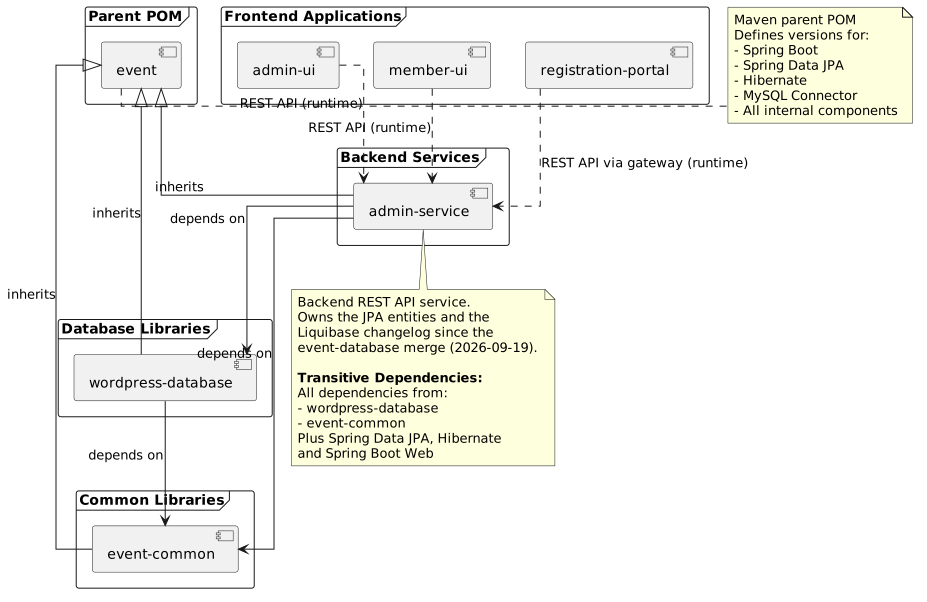
3. Runtime Dependencies
3.1. Backend Service Runtime Dependencies
The admin-service component has the following runtime dependencies:
Database Connections:
-
MySQL database for event data
-
MySQL database for legacy WordPress data (during migration period)
External Services:
-
Authentication provider (OAuth2/JWT)
-
Email service (SMTP)
-
Payment gateway integration
-
File storage service
3.2. Frontend Application Runtime Dependencies
The frontend applications (admin-ui, member-ui) have runtime dependencies on:
-
admin-serviceREST API -
Browser localStorage for session management
-
External CDN resources (if configured)
The registration-portal has runtime dependencies on:
-
admin-serviceREST API (proxied via Spring Cloud Gateway) -
HTTP session for server-side JWT storage
-
External Identity Provider (for OIDC authentication, optional)
See Registration Portal Architecture for details.
4. Dependency Graph
4.1. Direct Dependencies
| Component | Depends On | Purpose |
|---|---|---|
event-common |
event (parent) |
Common utility classes, constants, and helper functions |
wordpress-database |
event (parent), event-common |
Legacy WordPress JPA entities |
admin-service |
event (parent), event-common, wordpress-database |
REST API service with business logic. Also owns the JPA entities and the Liquibase changelog, merged in from |
admin-ui |
admin-service (runtime) |
Administration interface consuming REST API |
member-ui |
admin-service (runtime) |
Member portal consuming REST API |
registration-portal |
admin-service (runtime via gateway) |
Self-service registration portal (JHipster gateway proxying to admin-service) |
4.2. Transitive Dependencies
Due to Maven’s transitive dependency resolution, components inherit dependencies from their direct dependencies:
admin-service transitive dependencies:
-
All dependencies from
wordpress-database -
All dependencies from
event-common -
Spring Boot framework dependencies
-
Spring Data JPA and Hibernate ORM dependencies
-
MySQL JDBC driver
Spring Data JPA and Hibernate used to arrive transitively through event-database. They are direct dependencies of admin-service since that library was merged in.
5. Version Management
5.1. Parent POM Version Strategy
The event parent POM controls version numbers for the entire system. Its version number follows semantic versioning with a special strategy:
<version>${revision}</version>

<properties>
  <revision>1.2.0-SNAPSHOT</revision>
</properties>
Version Number Strategy:
-
Major version - Breaking API changes or major architectural changes
-
Minor version - New features, enhancements, backward-compatible changes
-
Patch version - Always 0 in parent POM (individual components manage patch versions)
|
The parent POM version (major.minor.0) mirrors the major and minor versions of the releasable software components, allowing individual components to have different patch versions while maintaining coordinated major/minor releases. |
5.2. Maven CI-Friendly Versioning
All components use Maven’s CI-friendly version approach using the ${revision} property:
<parent>
  <groupId>za.co.idealogic</groupId>
  <artifactId>event</artifactId>
  <version>${revision}</version>
</parent>

<artifactId>wordpress-database</artifactId>
<version>${revision}</version>

<properties>
  <revision>2.3.0</revision>
</properties>
Benefits:
-
Single property to update version across entire build
-
Easy version updates in CI/CD pipelines
-
Consistent versioning across multi-module builds
Flatten Maven Plugin:
The flatten-maven-plugin is required to properly publish artifacts with resolved versions:
<plugin>
  <groupId>org.codehaus.mojo</groupId>
  <artifactId>flatten-maven-plugin</artifactId>
  <version>1.5.0</version>
  <configuration>
    <updatePomFile>true</updatePomFile>
    <flattenMode>resolveCiFriendliesOnly</flattenMode>
  </configuration>
  <executions>
    <execution>
      <id>flatten</id>
      <phase>process-resources</phase>
      <goals>
        <goal>flatten</goal>
      </goals>
    </execution>
    <execution>
      <id>flatten.clean</id>
      <phase>clean</phase>
      <goals>
        <goal>clean</goal>
      </goals>
    </execution>
  </executions>
</plugin>
5.3. Dependency Version Management
The parent POM manages all dependency versions through the <dependencyManagement> section:
<dependencyManagement>
  <dependencies>
    <!-- Spring Boot BOM -->
    <dependency>
      <groupId>org.springframework.boot</groupId>
      <artifactId>spring-boot-dependencies</artifactId>
      <version>2.7.14</version>
      <type>pom</type>
      <scope>import</scope>
    </dependency>

    <!-- Internal Components -->
    <dependency>
      <groupId>za.co.idealogic</groupId>
      <artifactId>event-common</artifactId>
      <version>${revision}</version>
    </dependency>

    <dependency>
      <groupId>za.co.idealogic</groupId>
      <artifactId>wordpress-database</artifactId>
      <version>${revision}</version>
    </dependency>

  </dependencies>
</dependencyManagement>
5.4. Updating Dependency Versions
Process for updating component versions:
-
Update parent POM - Change
${revision}property ineventPOM -
Rebuild all components - Execute
mvn clean installfrom parent -
Test integration - Run integration tests to verify compatibility
-
Deploy to package registry - Use GitHub Actions workflow to deploy
Example version update:
# Update revision property in event/pom.xml
sed -i 's/<revision>1.2.0-SNAPSHOT<\/revision>/<revision>1.3.0-SNAPSHOT<\/revision>/' pom.xml

# Rebuild all components
mvn clean install

# Run integration tests
mvn verify -P integration-tests

# Deploy (via GitHub Actions or manually)
mvn deploy
6. Dependency Conflicts
6.1. Common Conflict Scenarios
Scenario 1: Spring Boot version mismatch
If a component imports a different Spring Boot version, it can cause classpath conflicts.
Resolution: Always import Spring Boot dependencies through the parent POM’s <dependencyManagement> section.
Scenario 2: Hibernate version conflicts
Hibernate versions must match across all JPA components.
Resolution: Use the Hibernate version defined in the Spring Boot BOM imported by the parent POM.
Scenario 3: Transitive dependency conflicts
Third-party libraries may bring conflicting transitive dependencies.
Resolution: Use <exclusions> to exclude conflicting transitive dependencies and explicitly declare the correct version in <dependencyManagement>.
6.2. Dependency Analysis Tools
Maven Dependency Plugin:
# View dependency tree
mvn dependency:tree

# View dependency tree for specific component
cd wordpress-database
mvn dependency:tree

# Analyze for conflicts
mvn dependency:analyze

# Display resolved dependency versions
mvn dependency:list
Maven Enforcer Plugin:
Add to parent POM to enforce dependency rules:
<plugin>
  <groupId>org.apache.maven.plugins</groupId>
  <artifactId>maven-enforcer-plugin</artifactId>
  <version>3.3.0</version>
  <executions>
    <execution>
      <id>enforce-dependencies</id>
      <goals>
        <goal>enforce</goal>
      </goals>
      <configuration>
        <rules>
          <dependencyConvergence/>
          <bannedDependencies>
            <excludes>
              <exclude>commons-logging:commons-logging</exclude>
            </excludes>
          </bannedDependencies>
        </rules>
      </configuration>
    </execution>
  </executions>
</plugin>
7. Migration Considerations
7.1. WordPress Database Deprecation
The wordpress-database dependency is scheduled for removal. During the migration:
Phase 1 (Months 1-3): Dual Dependencies
-
wordpress-databaseremains a dependency ofadmin-service -
Dual-write mode ensures data consistency
-
All components continue to depend on both
Phase 2 (Months 3-5): Migration
-
Data migration utilities added to
admin-service -
Validation tools ensure data integrity
-
Components begin transitioning off
wordpress-database
Phase 3 (Month 6): Completion
-
Remove
wordpress-databasedependency from all components -
Update parent POM to remove
wordpress-databasefrom<dependencyManagement> -
Archive
wordpress-databaserepository
Impact on Components:
| Component | Current State | Post-Migration State |
|---|---|---|
admin-service |
Depends on wordpress-database directly |
No wordpress-database dependency |
admin-ui |
Indirect dependency via admin-service |
No change (runtime dependency) |
member-ui |
Indirect dependency via admin-service |
No change (runtime dependency) |
8. Dependency Best Practices
8.1. Use Parent POM for Version Management
<!-- Good: Version managed by parent -->
<dependency>
  <groupId>org.springframework.boot</groupId>
  <artifactId>spring-boot-starter-web</artifactId>
</dependency>

<!-- Avoid: Explicit version override -->
<dependency>
  <groupId>org.springframework.boot</groupId>
  <artifactId>spring-boot-starter-web</artifactId>
  <version>2.7.14</version>
</dependency>
8.2. Minimize Dependency Scope
Use appropriate dependency scopes to minimize classpath pollution:
<!-- Runtime-only dependency -->
<dependency>
  <groupId>mysql</groupId>
  <artifactId>mysql-connector-java</artifactId>
  <scope>runtime</scope>
</dependency>

<!-- Test-only dependency -->
<dependency>
  <groupId>org.junit.jupiter</groupId>
  <artifactId>junit-jupiter</artifactId>
  <scope>test</scope>
</dependency>

<!-- Provided by container -->
<dependency>
  <groupId>javax.servlet</groupId>
  <artifactId>javax.servlet-api</artifactId>
  <scope>provided</scope>
</dependency>