Multi-Tenancy Architecture
1. Overview
The solution requires the ability to manage multiple organisations or clubs using the same software. To achieve that, a technique called multi-tenancy is used to logically separate the data, such as users, events and memberships, between these organisations.
Multi-tenancy enables:
-
Data Isolation - Complete separation of data between organizations
-
Custom Branding - Tenant-specific UI customization per domain
-
Scalability - Single application instance serving multiple organizations
-
Cost Efficiency - Shared infrastructure with logical separation
2. High Level Design
At the heart of the design is the Organisation entity which resides in the Admin Service. Each organisation or club is associated with an instance of this entity.
The Gateway applications, such as the Participant Portal, Membership Portal, Registration Portal, or Admin Portal, can each define separate Tenants, which are Gateway-specific URLs to serve that application, and are then linked to an Organisation. It is then possible to have members.myclub.com as a Tenant of the Membership Portal, which applies tenant-specific UI customization, but also limits any data to those of the Organisation.
3. Architecture Components
3.1. Organisation
An Organisation is a global entity and is associated with all of the high-level business entities. The Organisation entity resides in the Admin Service and represents a single customer organization (e.g., a running club, charity organization, etc.).
Key Characteristics:
-
Global Entity - Exists in the Admin Service (event database)
-
Business Context - Represents a real-world organization or club
-
Data Scope - All organizational data is scoped to Organisation.id
-
Immutable Reference - Organisation ID used throughout the system for data isolation
3.2. Tenant
A Tenant entity represents a unique Gateway domain (DNS) name for a Gateway application. Each Tenant is linked to a specific Organisation, which then enables that Gateway application operating at that domain to only display data associated with that Organisation.
Key Characteristics:
-
Gateway-Specific - Each gateway application has its own Tenant entities
-
Domain-Based - Typically resolved via URL subdomain
-
UI Customization - Enables tenant-specific branding and configuration
-
Organisation Reference - Links to Organisation either directly or via RegistrationSystem
Example:
A domain name like members.myclub.co.za could allow the administration of members for a specific club, even though the Gateway application and underlying back-end services host the data of multiple clubs.
3.3. Registration Portal Indirection
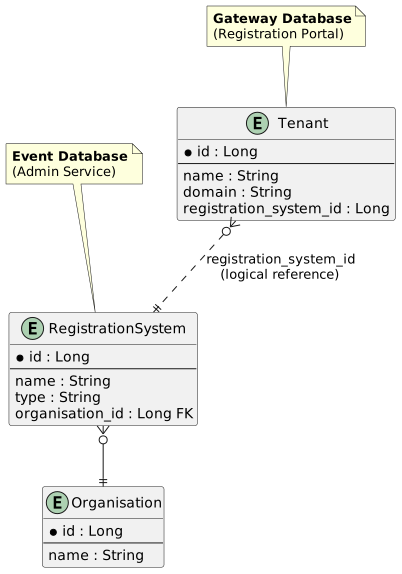
The Registration Portal uses indirection, where the Tenant is linked to a RegistrationSystem in the Admin Service, which in turn is linked to an Organisation. This design maintains proper microservice boundaries.
Relationship Chain:
Tenant (Gateway DB) → RegistrationSystem (Event DB) → Organisation (Event DB)
Benefits:
-
Microservice Boundaries - Gateway doesn’t directly reference Organisation
-
Server-Side Resolution - Organisation context determined by Admin Service
-
Authentication Context - RegistrationSystem ID passed during authentication
-
Proper Encapsulation - Gateway remains decoupled from business domain
4. Tenant Determination
4.1. Methods
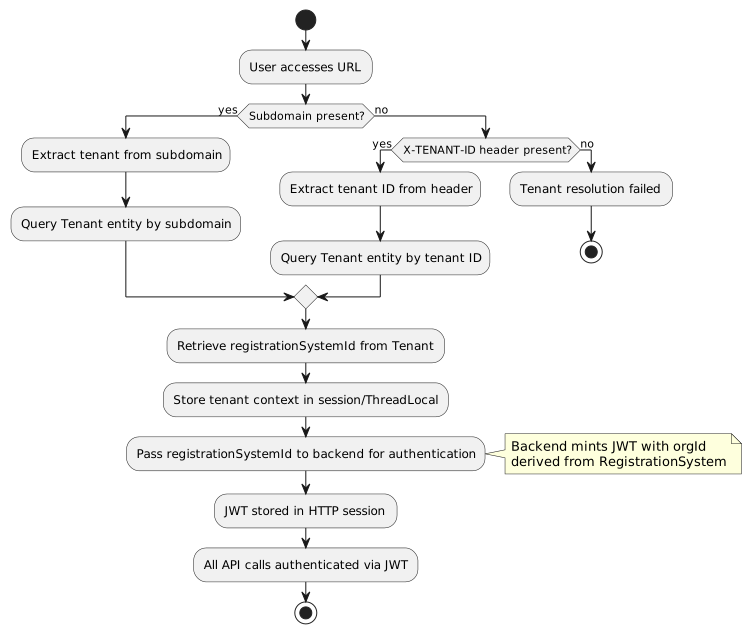
Gateway applications determine the tenant using the following methods:
| Method | Source | Example | Priority |
|---|---|---|---|
URL Subdomain |
DNS-based |
1 (Highest) |
|
X-TENANT-ID Header |
HTTP header |
|
2 |
4.3. URL Examples
Subdomain-based (Production):
https://runningclub.myapp.com/membership/register/42
→ Tenant: "runningclub" (resolved via subdomain lookup)
→ Backend resolves RegistrationSystem → Organisation
Header-based (API/Programmatic Access):
GET https://myapp.com/membership/register/42
X-TENANT-ID: 2 (runningclub)
→ Tenant: 2 - Running Club (from X-TENANT-ID header)
→ Backend resolves RegistrationSystem → Organisation
5. Organisational Entities
5.1. Primary Organisational Entities
Some entities in the solution are considered primary organisational entities and are all directly linked to an Organisation. These include:
-
API Key - Authentication credentials for external systems
-
Event - Event definitions and configurations
-
Membership Type - Membership categories and rules
-
Attachment - File attachments and documents
-
Number Type - Bib number configurations
-
Tag Type - Tagging and categorization systems
-
RegistrationSystem - External registration system integrations
Characteristics:
-
Direct foreign key to
Organisation.id -
Independently queryable by organisation
-
Form the root of data isolation boundaries
-
Must be filtered by organisation in all queries
5.2. Secondary Organisational Entities
Entities such as Event Participant, Event Category, Event Race Type, Race, Program Entry, Membership Period, Membership Criteria, etc. are all secondary entities, because they are associated with at least one primary organisational entity.
Resolution Strategy:
It is possible to determine if a secondary organisational entity can be served to the user by resolving the primary entity, looking up the organisation, and determining if the user is authorized to access the entities of that organisation.
Multiple Primary References:
Some entities might even have multiple primary organisational entities, sometimes indirectly via an extended graph. In these situations, the entities must be equipped with validation logic to ensure that only entities of the same organisation can be associated together.
Example:
// EventParticipant is secondary (via Event)
@Entity
public class EventParticipant {
    @ManyToOne(optional = false)
    private Event event;  // Event → Organisation

    // Event.organisation determines organisation scope
}

// Race is secondary (via Event)
@Entity
public class Race {
    @ManyToOne(optional = false)
    private Event event;  // Event → Organisation
}

// ProgramEntry has validation to ensure consistency
@Entity
public class ProgramEntry {
    @ManyToOne(optional = false)
    private Person person;

    @ManyToOne(optional = false)
    private Race race;  // Race → Event → Organisation

    @PrePersist
    @PreUpdate
    private void validateOrganisation() {
        // Ensure person and race belong to same organisation
    }
}
6. Spring Boot Implementation
6.1. Overview
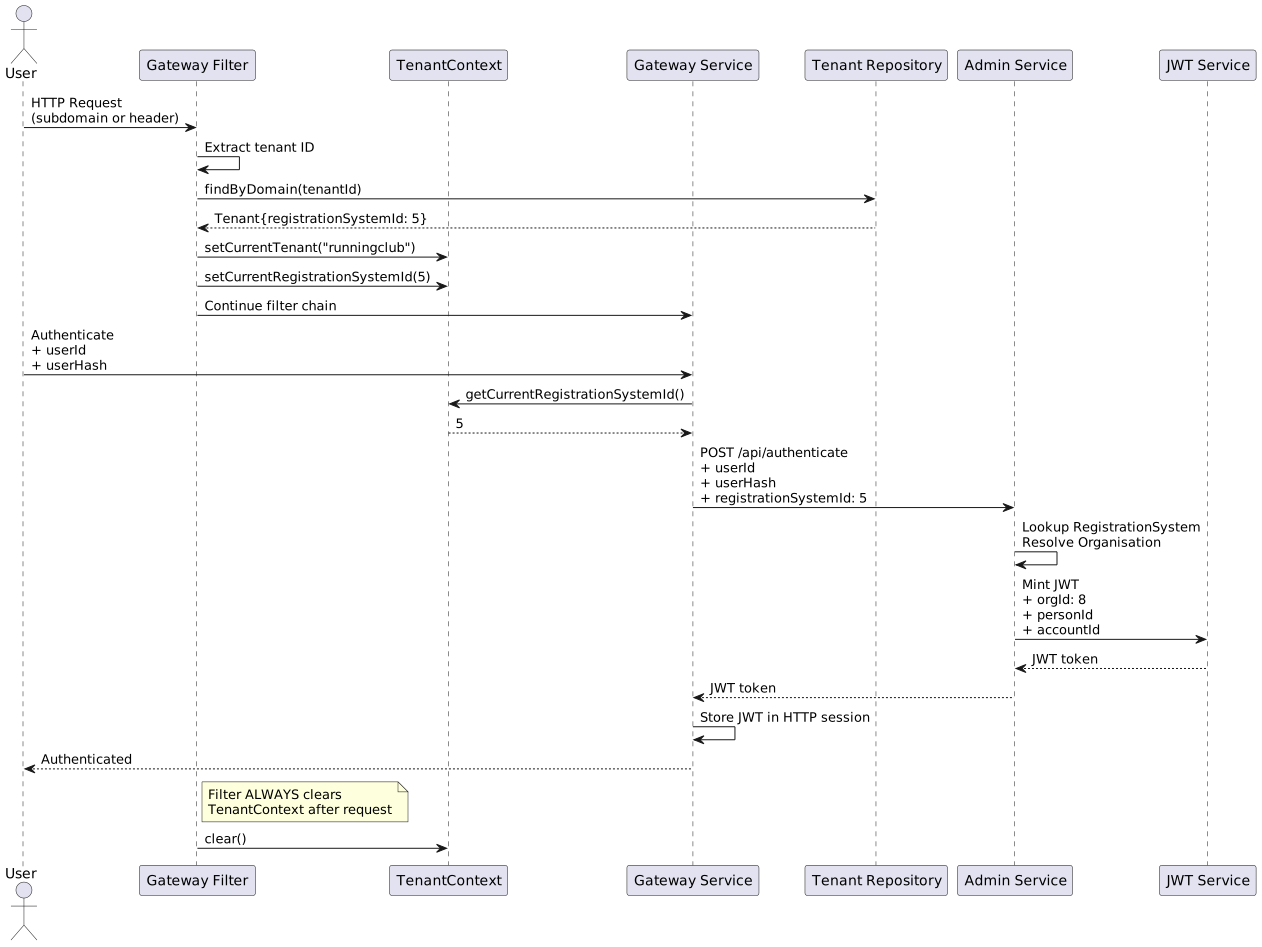
The Spring Boot Gateway applications implement tenant resolution using interceptors and filters that extract the tenant context from the request and store it in a ThreadLocal for the duration of the request.
6.2. Tenant Context
TenantContext Class:
package za.co.idealogic.common.tenant;

/**
 * ThreadLocal storage for the current tenant context.
 * Must be cleared after each request to prevent thread pool contamination.
 */
public class TenantContext {
    private static ThreadLocal<String> currentTenant = new ThreadLocal<>();
    private static ThreadLocal<Long> currentRegistrationSystemId = new ThreadLocal<>();

    /**
     * Set the current tenant identifier (e.g., subdomain or tenant ID)
     */
    public static void setCurrentTenant(String tenant) {
        currentTenant.set(tenant);
    }

    /**
     * Get the current tenant identifier
     */
    public static String getCurrentTenant() {
        return currentTenant.get();
    }

    /**
     * Set the registration system ID for the current tenant
     */
    public static void setCurrentRegistrationSystemId(Long registrationSystemId) {
        currentRegistrationSystemId.set(registrationSystemId);
    }

    /**
     * Get the registration system ID for the current tenant
     */
    public static Long getCurrentRegistrationSystemId() {
        return currentRegistrationSystemId.get();
    }

    /**
     * Clear all tenant context. MUST be called after each request.
     */
    public static void clear() {
        currentTenant.remove();
        currentRegistrationSystemId.remove();
    }
}
6.3. Tenant Resolution Filter
TenantResolutionFilter:
package za.co.idealogic.gateway.filter;

import jakarta.servlet.*;
import jakarta.servlet.http.HttpServletRequest;
import org.springframework.core.annotation.Order;
import org.springframework.stereotype.Component;
import za.co.idealogic.common.tenant.TenantContext;
import za.co.idealogic.gateway.domain.Tenant;
import za.co.idealogic.gateway.repository.TenantRepository;

import java.io.IOException;
import java.util.Optional;

/**
 * Servlet filter that resolves the tenant from the request and stores it in TenantContext.
 * Executes early in the filter chain (Order 1).
 */
@Component
@Order(1)
public class TenantResolutionFilter implements Filter {

    private final TenantRepository tenantRepository;

    public TenantResolutionFilter(TenantRepository tenantRepository) {
        this.tenantRepository = tenantRepository;
    }

    @Override
    public void doFilter(ServletRequest request, ServletResponse response, FilterChain chain)
            throws IOException, ServletException {

        try {
            HttpServletRequest httpRequest = (HttpServletRequest) request;

            // 1. Try to resolve tenant from URL subdomain
            String tenantId = extractTenantFromSubdomain(httpRequest);

            // 2. If not found, try X-TENANT-ID header
            if (tenantId == null) {
                tenantId = httpRequest.getHeader("X-TENANT-ID");
            }

            // 3. Lookup tenant entity
            if (tenantId != null) {
                Optional<Tenant> tenantOpt = tenantRepository.findByDomain(tenantId);

                if (tenantOpt.isPresent()) {
                    Tenant tenant = tenantOpt.get();
                    TenantContext.setCurrentTenant(tenant.getDomain());
                    TenantContext.setCurrentRegistrationSystemId(tenant.getRegistrationSystemId());
                } else {
                    // Log warning: tenant not found
                }
            }

            // Continue filter chain
            chain.doFilter(request, response);

        } finally {
            // CRITICAL: Always clear context after request
            TenantContext.clear();
        }
    }

    /**
     * Extract tenant identifier from subdomain
     * E.g., "runningclub.example.com" → "runningclub"
     */
    private String extractTenantFromSubdomain(HttpServletRequest request) {
        String serverName = request.getServerName();

        // Skip if localhost or IP address
        if (serverName.equals("localhost") || serverName.matches("\\d+\\.\\d+\\.\\d+\\.\\d+")) {
            return null;
        }

        // Extract subdomain (first part before first dot)
        String[] parts = serverName.split("\\.");
        if (parts.length > 2) {
            return parts[0]; // Return subdomain
        }

        return null;
    }
}
6.4. Tenant Repository
TenantRepository Interface:
package za.co.idealogic.gateway.repository;

import org.springframework.data.jpa.repository.JpaRepository;
import org.springframework.stereotype.Repository;
import za.co.idealogic.gateway.domain.Tenant;

import java.util.Optional;

@Repository
public interface TenantRepository extends JpaRepository<Tenant, Long> {

    /**
     * Find tenant by domain name (subdomain or full domain)
     */
    Optional<Tenant> findByDomain(String domain);

    /**
     * Find tenant by registration system ID
     */
    Optional<Tenant> findByRegistrationSystemId(Long registrationSystemId);
}
6.5. Tenant Entity
Tenant Entity (Gateway Database):
package za.co.idealogic.gateway.domain;

import jakarta.persistence.*;
import jakarta.validation.constraints.NotNull;

/**
 * Tenant entity representing a unique domain for this Gateway application.
 * Links to a RegistrationSystem in the Admin Service.
 */
@Entity
@Table(name = "tenant")
public class Tenant {

    @Id
    @GeneratedValue(strategy = GenerationType.IDENTITY)
    private Long id;

    @NotNull
    @Column(name = "name", nullable = false)
    private String name;

    @NotNull
    @Column(name = "domain", nullable = false, unique = true)
    private String domain;

    @NotNull
    @Column(name = "registration_system_id", nullable = false)
    private Long registrationSystemId; // References RegistrationSystem.id in Admin Service

    // OAuth2/OIDC configuration (optional)
    @Column(name = "issuer_url")
    private String issuerURL;

    @Column(name = "client_id")
    private String clientId;

    @Column(name = "client_secret")
    private String clientSecret;

    // Getters and setters
    public Long getId() {
        return id;
    }

    public void setId(Long id) {
        this.id = id;
    }

    public String getName() {
        return name;
    }

    public void setName(String name) {
        this.name = name;
    }

    public String getDomain() {
        return domain;
    }

    public void setDomain(String domain) {
        this.domain = domain;
    }

    public Long getRegistrationSystemId() {
        return registrationSystemId;
    }

    public void setRegistrationSystemId(Long registrationSystemId) {
        this.registrationSystemId = registrationSystemId;
    }

    public String getIssuerURL() {
        return issuerURL;
    }

    public void setIssuerURL(String issuerURL) {
        this.issuerURL = issuerURL;
    }

    public String getClientId() {
        return clientId;
    }

    public void setClientId(String clientId) {
        this.clientId = clientId;
    }

    public String getClientSecret() {
        return clientSecret;
    }

    public void setClientSecret(String clientSecret) {
        this.clientSecret = clientSecret;
    }
}
6.6. Usage in Services
Accessing Tenant Context:
package za.co.idealogic.gateway.service;

import org.springframework.stereotype.Service;
import za.co.idealogic.common.tenant.TenantContext;

@Service
public class AuthenticationService {

    /**
     * Authenticate user with Admin Service
     */
    public JwtToken authenticateUser(String userId, String userHash) {
        // Get current tenant's registration system ID
        Long registrationSystemId = TenantContext.getCurrentRegistrationSystemId();

        if (registrationSystemId == null) {
            throw new IllegalStateException("No tenant context available");
        }

        // Call Admin Service to mint JWT
        // Pass registrationSystemId for organisation resolution
        return adminServiceClient.authenticate(userId, userHash, registrationSystemId);
    }
}
6.7. Configuration
Application Properties:
# application.yml
spring:
  datasource:
    url: jdbc:postgresql://localhost:5432/gateway_db
    username: ${DB_USERNAME}
    password: ${DB_PASSWORD}

  jpa:
    hibernate:
      ddl-auto: validate
    properties:
      hibernate:
        dialect: org.hibernate.dialect.PostgreSQLDialect

# Tenant resolution settings
tenant:
  resolution:
    enabled: true
    subdomain-extraction: true
    header-name: X-TENANT-ID
7. Multi-Tenant Data Isolation
7.1. Backend Enforcement
All queries to the Admin Service must be scoped to the Organisation ID contained in the JWT token:
@Service
public class EventService {

    @PreAuthorize("hasPermission(#organisationId, 'Organisation', 'READ')")
    public List<Event> getEvents(Long organisationId) {
        // Query automatically scoped to organisationId
        return eventRepository.findByOrganisationId(organisationId);
    }
}
7.2. Security Rules
-
Users can only access data within their organisation
-
Organisation ID validated against user permissions (from JWT)
-
Cross-organisation queries blocked
-
Audit logging for access attempts
7.3. JWT Token Structure
The JWT token minted by the Admin Service contains:
{
  "sub": "12345",
  "orgId": 8,
  "personId": 456,
  "accountId": 789,
  "linkedPersonIds": [456, 457, 458],
  "authorities": ["ROLE_USER", "ROLE_MEMBER"],
  "exp": 1735123456,
  "iat": 1735120456
}
Claims:
-
orgId- Organisation ID from RegistrationSystem.organisation -
personId- Person.id for the authenticated user -
accountId- OrgUser.id (account ID) -
linkedPersonIds- Array of linked Person IDs -
authorities- User roles and permissions
9. Best Practices
9.1. ThreadLocal Management
CRITICAL: Always clear TenantContext after each request to prevent thread pool contamination:
try {
    // Process request
    chain.doFilter(request, response);
} finally {
    TenantContext.clear(); // MUST be in finally block
}
9.2. Tenant Validation
Validate that the tenant exists before processing the request:
if (tenantId != null) {
    Optional<Tenant> tenantOpt = tenantRepository.findByDomain(tenantId);

    if (tenantOpt.isEmpty()) {
        response.setStatus(HttpServletResponse.SC_NOT_FOUND);
        response.getWriter().write("Tenant not found");
        return; // Stop processing
    }
}10. Security Considerations
10.1. Data Isolation
-
Tenant context determines data scope
-
JWT token provides organisation-level security
-
Backend enforces organisation-scoped queries
-
Cross-tenant data access prevented at multiple layers