General Ledger Design
1. Overview
This document specifies how EMS records the financial effect of what it sells and of the money it handles. Each business transaction — a sale, a payment, a fee, a refund, a payout, a service charge, a disbursement to an organiser — posts to the ledger when it happens, using the amounts actually charged. The ledger is append only: a posting is never edited, and every correction is a further posting.
Postings belong to the books of the company they concern, so the ledger holds several companies' books and any one company’s books can be projected on their own. Posted transactions are consolidated into journals for export to external accounting software.
How event income moves from the payer through payment processors and a service provider to the organiser — and what the organiser is owed — is specified in Income Processing. This document is the ledger it posts into.
2. Status
Implementation status: proposed, not implemented.
Related architecture: Financial Management Architecture
Amount definitions: Order Line Item Amounts
Income movements: Income Processing
Decision history: design-journal/2026-09/financial-ledger-posting-model.adoc,
design-journal/2026-10/income-processing.adoc
3. Purpose
3.1. Business Goals
-
Post at the obligation - A sale is in the ledger when it becomes a real obligation, a payment when money is received
-
Actual amounts - Every posting uses the sales price, discount and fee actually recorded; an estimated fee is replaced by the actual, by difference
-
Each company’s books - One ledger holds several companies; each company’s projection is a complete, balanced set of books
-
Simple processors - Operators say where money was received; which accounts that means is configuration
-
Traceability - Every posting links back to the order, line item, payment or event it came from
-
Append only - Nothing posted is edited; a correction posts a reversal or a difference
-
Journal consolidation - Transactions are consolidated per company for export
-
Steady state balance - All accounts net to zero once everything is exported
3.2. Design Rationale
Orders are operational records and change for business reasons at any time. The ledger is the financial record, so it is kept separate from them:
-
Orders are operational - Lines are added and removed, prices corrected, orders cancelled
-
Ledger records are financial - They keep an audit trail of what was recorded and when
-
Nothing posted changes - A statement or a journal can always say what changed since it was produced
The shapes below were chosen over these alternatives:
| Rejected alternative | Why it loses |
|---|---|
Post a sale when the order is placed |
An online checkout that is abandoned would post a sale and later its reversal. A large share of placed orders never reach payment, so the books would carry mostly noise. |
Post a sale only when an order is paid |
The ledger would never hold what is owed. Entries accepted without payment — an invoiced bulk order, a desk entry on account, a rider who raced unpaid — would be invisible to the books. |
Correct a posting in place until it is journaled |
A statement to an organiser reads postings too. An in-place edit would silently change figures a statement had already shown, and every correction would first have to ask whether anything had read it. |
Derive every account from a payment processor held on the order |
An order can be paid in parts, paid twice, or started online and completed at a desk, so one order-level processor cannot say where money was received. The processor is on each payment. |
Treat revenue as the amount net of fees |
Revenue is |
Mark journaled transactions by changing their type to |
The original type would be lost, so unwinding a journal could not restore it. A journaled transaction instead references the journal that includes it. |
Let operators choose a ledger account when taking a payment |
Operators at a desk know whether money went into a cash box, through a card machine or through online payment. The accounts behind each are configuration. |
One set of predefined accounts shared by every company |
Each company’s books must reference only its own accounts. Accounts are owned per organisation and found by role. |
4. Amounts
Every posting uses the amounts persisted on the order line items and payments. Each is an actual, recorded at the time of the transaction by the channel that made it:
| Amount | Actual |
|---|---|
|
The sales price the selling channel recorded for the line |
|
The discount value the selling channel applied to the line |
|
|
|
The charge the processor’s provider made for collecting the payment |
Nothing is recomputed from the current price list when posting. A fee is the one amount that may be known only later: until the provider’s statement arrives it is estimated from the processor’s fee schedule, and the difference posts when the actual is known (see Provider Fees). Where a provider charges a fee per payment rather than per line, the fee is apportioned across the payment’s lines as described in Fee attribution, so the line fees sum exactly to the charge.
For a fully paid line, once the actual fee is known, the ledger records:
income            = gross
discount allowed  = discount
fee expense       = fee
money received    = gross - discount - fee   (into the processor's receipt account)
5. Posting Triggers
Each business transaction posts when it happens:
| Business transaction | When it posts | Transaction type |
|---|---|---|
Sale |
When the order becomes a real obligation: its first payment, or acceptance without payment — an invoiced bulk order, a desk entry on account, a rider who raced unpaid. An order still being assembled, or an online checkout that is never paid, posts nothing. |
|
Correction to a sale — a line added or removed, a price or discount changed, the order cancelled |
When made, as a further posting for the difference or a reversal |
|
Payment |
When money is received into a processor, with the fee estimated or known |
|
Actual fee replacing an estimate |
When the provider’s statement is imported, for the difference only |
|
Refund of money |
When money is returned |
|
Payout or cash banking — money moved between two processors of one owner |
When the provider pays out or the cash is banked |
|
Service charge to an organiser |
When it counts — see Charge bases |
|
Disbursement to an organiser, payment on an organiser’s behalf, deposit from an organiser |
When recorded |
|
Manual correction not arising from any of the above |
When made |
|
Journal |
When created |
|
A discount granted after the sale — including a refund recorded against an unpaid order to make an entry free — is a correction to the sale, not a refund. No money moves.
5.1. An order is intent until a trigger fires
An order and its lines are created at registration, priced and linked to the participant or membership. That is an operational record of intent, and it posts nothing: it may be edited, re-priced or cancelled freely. The sale enters the books when a trigger fires, using the line amounts as they stand then:
| Trigger | What posts |
|---|---|
First payment received |
The sale and the payment, together. A part payment posts the whole sale and clears part of the receivable. |
Accepted on account — an operator action on the order, recording who, when, why and an optional invoice reference |
The sale, leaving a receivable |
Raced unpaid — results recorded for a participant whose order is unpaid |
The sale, leaving a receivable |
Nothing else posts a sale: an unpaid pay-at-counter order whose rider never arrives, or an EFT order awaiting its transfer, waits for payment.
5.2. Signal and sweep
Every posting is driven both by a signal, which posts promptly when a trigger fires, and by a sweep, which finds every eligible order, payment, charge or movement not yet posted and posts it. Posting is therefore idempotent: one sale posting per order per set of books, one payment posting per payment, and a sweep that finds nothing to do changes nothing.
6. Database Schema
6.1. Entity Relationships
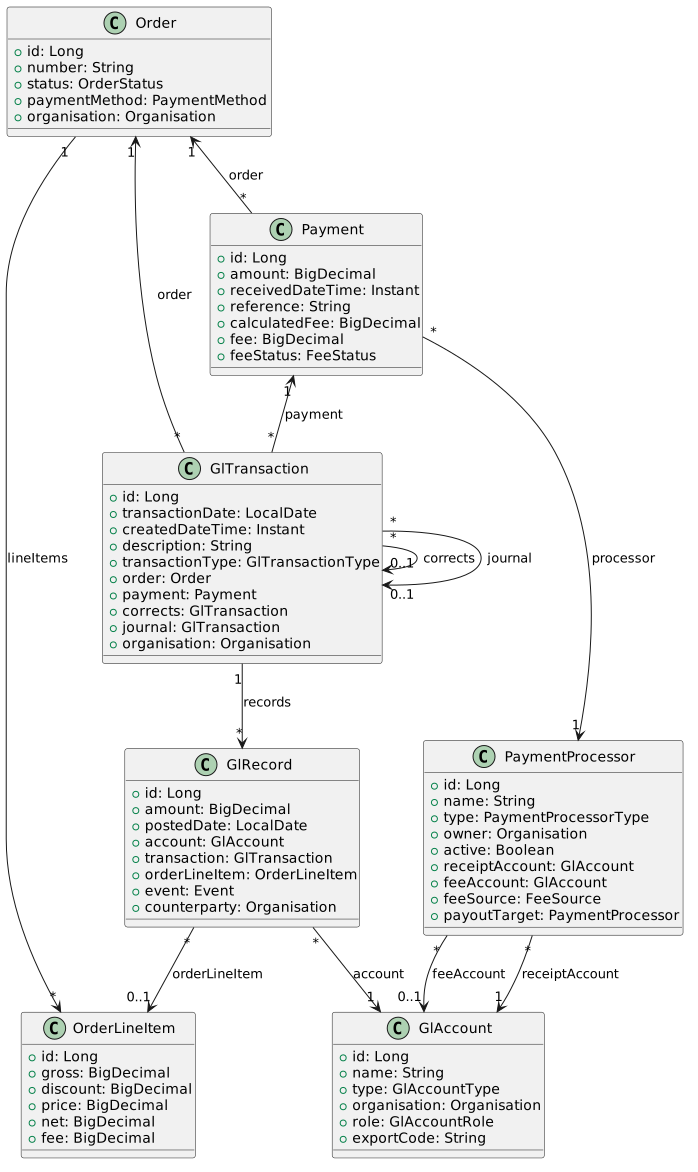
A sale posts one ORDER transaction per set of books it affects, and a payment one PAYMENT transaction per set of
books. See Books and Tenancy.
6.2. Relationship Ownership
| Relationship | Owner | Rationale |
|---|---|---|
GlTransaction → Order, Payment |
GlTransaction (FK on gl_transaction) |
Financial record references operational source |
GlTransaction → Corrected transaction |
GlTransaction (FK on gl_transaction, self-referencing) |
A reversal or difference names the posting it corrects |
GlTransaction → Journal |
GlTransaction (FK on gl_transaction, self-referencing) |
A source transaction records the journal that includes it |
GlRecord → OrderLineItem, Event, Counterparty |
GlRecord (FK on gl_record) |
The dimensions a line is reported by |
GlAccount → Organisation |
GlAccount (FK on gl_account) |
Each company’s chart is its own rows |
6.3. Table: gl_transaction (Modified)
CREATE TABLE gl_transaction (
    id BIGINT AUTO_INCREMENT PRIMARY KEY,

    -- Transaction details
    transaction_date DATE NOT NULL,
    created_date_time TIMESTAMP NOT NULL,
    description VARCHAR(50),

    -- Type discriminator
    transaction_type VARCHAR(2) NOT NULL,        -- see GlTransactionType

    -- Relationships
    order_id BIGINT,                             -- FK to sales_order (nullable)
    payment_id BIGINT,                           -- FK to payment (nullable)
    corrects_id BIGINT,                          -- FK to gl_transaction; the posting this corrects
    journal_id BIGINT,                           -- FK to gl_transaction; set when journaled
    organisation_id BIGINT NOT NULL,             -- the books this transaction belongs to

    CONSTRAINT fk_gl_transaction_order
        FOREIGN KEY (order_id) REFERENCES sales_order(id),
    CONSTRAINT fk_gl_transaction_corrects
        FOREIGN KEY (corrects_id) REFERENCES gl_transaction(id),
    CONSTRAINT fk_gl_transaction_journal
        FOREIGN KEY (journal_id) REFERENCES gl_transaction(id),
    CONSTRAINT fk_gl_transaction_organisation
        FOREIGN KEY (organisation_id) REFERENCES organisation(id)
);
6.4. Table: gl_record (Modified)
CREATE TABLE gl_record (
    id BIGINT AUTO_INCREMENT PRIMARY KEY,

    -- Amount (positive = debit, negative = credit)
    amount DECIMAL(21,2) NOT NULL,
    posted_date DATE NOT NULL,

    -- Relationships
    account_id BIGINT NOT NULL,
    transaction_id BIGINT NOT NULL,
    order_line_item_id BIGINT,                   -- FK to order_line_item (nullable)
    event_id BIGINT,                             -- FK to event (nullable)
    counterparty_organisation_id BIGINT,         -- FK to organisation (nullable)

    CONSTRAINT fk_gl_record_account
        FOREIGN KEY (account_id) REFERENCES gl_account(id),
    CONSTRAINT fk_gl_record_transaction
        FOREIGN KEY (transaction_id) REFERENCES gl_transaction(id),
    CONSTRAINT fk_gl_record_line_item
        FOREIGN KEY (order_line_item_id) REFERENCES order_line_item(id),
    CONSTRAINT fk_gl_record_event
        FOREIGN KEY (event_id) REFERENCES event(id),
    CONSTRAINT fk_gl_record_counterparty
        FOREIGN KEY (counterparty_organisation_id) REFERENCES organisation(id)
);
event_id is set on every line that concerns an event, so event and series figures are read from the ledger.
counterparty_organisation_id is set on lines that record a balance with another company — the pair accounts in
The Agent Model — so one account per company serves
every company it deals with.
6.5. Table: gl_account (Modified)
CREATE TABLE gl_account (
    id BIGINT AUTO_INCREMENT PRIMARY KEY,
    name VARCHAR(100) NOT NULL,
    type VARCHAR(20),
    organisation_id BIGINT NOT NULL,             -- the company whose chart this is
    role VARCHAR(30),                            -- replaces the global `predefined` UUID
    export_code VARCHAR(30),                     -- the account's number in the accounting software

    CONSTRAINT fk_gl_account_organisation
        FOREIGN KEY (organisation_id) REFERENCES organisation(id),
    CONSTRAINT uk_gl_account_role
        UNIQUE (organisation_id, role)
);
6.6. Enumerations
6.6.1. GlTransactionType
| Value | Code | Meaning |
|---|---|---|
|
|
A sale, posted when it becomes a real obligation, and corrections to it |
|
|
Money received into a processor, the fee charged for it, and the fee’s later difference |
|
|
Money returned to a customer |
|
|
Money moved between two processors of one owner — a payout, cash banked — and its fee |
|
|
A service provider’s charge to an organiser |
|
|
Money between a service provider and an organiser — a disbursement, a payment on the organiser’s behalf, a deposit |
|
|
A manual correction not arising from the above |
|
|
A consolidated export entry |
Stored as varchar(2) via a converter. A transaction’s type never changes; being journaled is recorded by
journal_id.
6.6.2. GlAccountType
public enum GlAccountType {
    BANK,               // Bank account
    ASSET,              // Asset account
    LIABILITY,          // Liability account
    ACCOUNT_PAYABLE,    // Accounts payable
    ACCOUNT_RECEIVABLE, // Accounts receivable
    INCOME,             // Income account
    EXPENSE             // Expense account
}
6.6.3. GlAccountRole
| Role | Type | Used by |
|---|---|---|
|
INCOME |
Seller: sales income |
|
INCOME |
Seller: discounts, kept visible |
|
ACCOUNT_RECEIVABLE |
Seller: what customers owe |
|
LIABILITY |
Seller: money received beyond what an order owes |
|
ASSET |
Organiser: its money a service provider holds |
|
EXPENSE |
Organiser: service-provider charges |
|
EXPENSE |
Organiser: costs paid on its behalf |
|
EXPENSE |
Either: payment provider fees borne |
|
LIABILITY |
Service provider: organisers' money it holds |
|
INCOME |
Service provider: its charges |
|
EXPENSE |
Processor owner: payout fees |
A processor’s receipt and fee accounts are referenced from the processor rather than found by role, because one company may own several processors.
7. Accounts
-
Every account belongs to one organisation. A company’s chart in EMS is its own rows, and a transaction references only accounts of the company whose books it is in.
-
Postings find accounts by role, never by an operator’s choice. The role is unique within an organisation.
-
Accounts are created from a template the first time a company needs them — its first posting, or a processor created for it. No chart has to be set up before a first payment.
-
Each account may carry an export code: its number in the company’s accounting software, used when journals are exported. Accounts may be renamed and coded; roles are fixed.
The accounting software remains the chart of record. EMS holds only the accounts it posts to, each mapped to one there.
8. Payment Processors
A payment records where the money was received by naming its PaymentProcessor: a cash box, a card machine, a
bank account, or an online payment provider account. Operators choose a processor; they never choose an account.
Each processor belongs to one organisation — the company that owns the money it receives — and maps to accounts in that organisation’s books:
-
receiptAccount(required) - where money received through this processor is held -
feeAccount(optional) - where fees charged by this processor’s provider are expensed; empty for a cash box
Processors, their fee schedules and payout targets are specified in Income Processing.
9. Account Resolution
Accounts are resolved from what each posting is about, never from how a different posting was made:
| Posting | Account | Resolved from |
|---|---|---|
Sale |
Income, discount allowed, receivable |
The selling organisation, by role |
Payment |
Receipt, fee |
The payment’s processor |
Payment in excess of what is owed |
Customer credit |
The selling organisation, by role |
Payment into another company’s processor |
Due to organiser, held by service provider |
Each company, by role, with the other as counterparty |
Charge, settlement |
Each company, by role |
The granularity of the income account — one per organisation, or per event or product — is not yet settled; one per organisation applies until it is.
10. Posting Rules
10.1. Sale
Posted as an ORDER transaction in the seller’s books when the order becomes a real obligation.
| Record | Amount | Per | Sign |
|---|---|---|---|
Income |
|
Line item |
Credit (negative) |
Discount allowed |
|
Line item |
Debit (positive) |
Receivable |
Sum of |
Order (consolidated) |
Debit (positive) |
10.2. Payment
Posted as a PAYMENT transaction when money is received. Where the seller owns the processor:
| Record | Amount | Per | Sign |
|---|---|---|---|
Receipt |
Amount received less |
Payment (consolidated) |
Debit (positive) |
Fee |
|
Line item |
Debit (positive) |
Receivable |
Amount received, up to what the order still owes |
Order (consolidated) |
Credit (negative) |
Customer credit |
Any amount received beyond what the order owes |
Payment |
Credit (negative) |
The fee is the estimate from the processor’s schedule until the provider’s statement is imported; the difference
then posts as a further PAYMENT transaction on the same payment, between the fee and receipt accounts. Either way
the receipt account ends with gross - discount - fee.
Where another company owns the processor, the payment posts in both companies' books through the pair accounts — see Receipt into the service provider’s processor.
Customer credit remains until it is resolved — refunded, or applied to another order.
10.3. Refund
Posted as a REFUND transaction when money is returned: debit income (or customer credit, for an overpayment
returned) for the amount refunded against the line, credit the receipt account of the processor the money was
returned from. A fee the provider retains is not reversed.
10.5. Example: A Sale and Its Payment
An online order with two entries. Entry A sells at R200.00 with no discount; entry B sells at R200.00 with a R20.00 discount. The customer pays R380.00 online, and the gateway charges R18.35, apportioned as R9.66 to A and R8.69 to B.
Sale (ORDER, at the first payment):
| Account | Description | Debit | Credit |
|---|---|---|---|
Event Income |
Entry A |
R200.00 |
|
Event Income |
Entry B |
R200.00 |
|
Discount Allowed |
Entry B |
R20.00 |
|
Receivable |
Order (consolidated) |
R380.00 |
|
Totals |
R400.00 |
R400.00 |
Payment (PAYMENT, when the money is received):
| Account | Description | Debit | Credit |
|---|---|---|---|
Gateway Balance |
Received less fee |
R361.65 |
|
Payment Fees |
Entry A |
R9.66 |
|
Payment Fees |
Entry B |
R8.69 |
|
Receivable |
Order (consolidated) |
R380.00 |
|
Totals |
R380.00 |
R380.00 |
The gateway balance holds R361.65: gross R400.00, less discount R20.00, less fee R18.35. Between the two postings the receivable nets to zero. Had the same order been an invoiced bulk order accepted without payment, the sale would have posted on acceptance and the R380.00 would stand in the books as owed until paid.
11. Books and Tenancy
The ledger holds the books of more than one company. A company’s books are the transactions whose
organisation is that company.
-
Every transaction belongs to exactly one company’s books and references only that company’s accounts.
-
Every transaction balances, so any one company’s transactions, taken alone, balance. That projection is a complete set of books for that company.
-
The seller’s books carry the sale. The processor owner’s books carry the money received. When the seller owns the processor, a payment is one transaction. When a different company owns it — a service provider collecting as agent, or a cash box operated on another’s behalf — the payment posts one transaction in each company’s books, each balanced, both referencing the same payment, through the pair accounts due to organiser and held by service provider with each other as counterparty.
-
The balance between two companies is the balance of the pair accounts for that counterparty. It is kept per pair of companies, not per event; each line still carries its event.
12. Corrections
12.1. Append only
No posting is edited or deleted. A correction posts a further transaction that references the one it corrects
(corrects_id): a reversal of the original, or the difference. This holds before and after journaling.
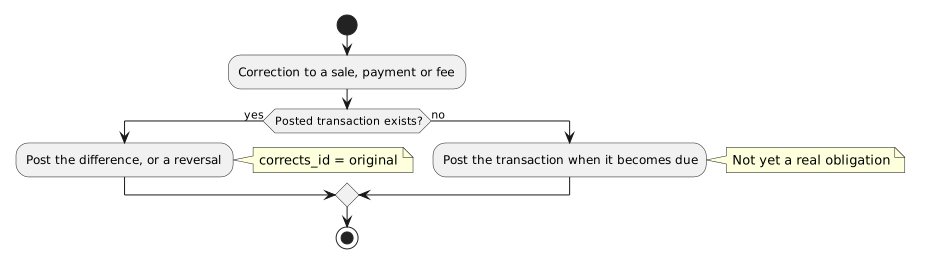
A correction carries the affected line item where there is one, and is included by the next journal.
Two consequences:
-
Reports over time are exact. What changed since a statement or a journal is the postings dated after it. A statement already issued and a journal already exported never change underneath their readers.
-
Corrections that cancel out still appear. A duplicate order and its reversal are two postings. Within one journal they consolidate to zero per account, so the exported books are unaffected; a view may later hide such pairs to simplify the position.
12.2. Example: Price Correction
-
An entry sold at R200.00 is posted on 15 January
-
On 20 January the entry is found to belong to a category priced at R180.00, and the sale is corrected
-
An
ORDERtransaction for the difference is posted, referencing the original:
| Account | Description | Debit | Credit |
|---|---|---|---|
Event Income |
Price correction |
R20.00 |
|
Receivable |
Price correction |
R20.00 |
If the entry had already been paid, the R20.00 credit leaves the order over-paid. The over-payment is resolved like any other customer credit.
13. Journal Management
13.1. Journal Creation
A journal consolidates one company’s transactions that no journal yet includes. Multiple optional filter parameters allow flexible consolidation:
13.1.1. Filter Parameters
| Parameter | Type | Description |
|---|---|---|
organisationId |
Long (required) |
The company whose books are journaled |
toDate |
LocalDate (required) |
Include transactions up to and including this date |
fromDate |
LocalDate (optional) |
Include transactions from this date (if null, includes all prior) |
registrationSystemId |
Long (optional) |
Include only transactions for orders from this registration system |
paymentProcessorId |
Long (optional) |
Include only payment, refund and transfer transactions through this processor |
eventId |
Long (optional) |
Include only records carrying this event |
description |
String (optional) |
Journal description |
Creating a journal:
-
Selects the company’s transactions other than
JOURNALmatching the filters whosejournal_idis empty. -
Creates a
JOURNALtransaction in that company’s books. -
Creates one consolidated record per account, summing the selected records, carrying each account’s export code.
-
Sets
journal_idon each selected transaction. -
Stores the filter criteria with the journal.
14. API Design
14.1. Endpoints
| Method | Endpoint | Description |
|---|---|---|
POST |
|
Create journal for date range |
GET |
|
List journals (paginated) |
GET |
|
Get journal details |
GET |
|
Get journal GL records |
DELETE |
|
Delete journal (unwind) |
14.2. Request/Response Examples
The shapes below are planned, not implemented.
14.2.1. Create Journal
# Minimal request - the company's books up to a date
curl -X POST http://localhost:8080/api/gl/journals \
  -H "Authorization: Bearer $TOKEN" \
  -H "Content-Type: application/json" \
  -d '{
    "organisationId": 1,
    "toDate": "2026-01-31",
    "description": "January 2026 Journal"
  }'

# Full request - with optional filters
curl -X POST http://localhost:8080/api/gl/journals \
  -H "Authorization: Bearer $TOKEN" \
  -H "Content-Type: application/json" \
  -d '{
    "organisationId": 1,
    "fromDate": "2026-01-01",
    "toDate": "2026-01-31",
    "registrationSystemId": 5,
    "paymentProcessorId": 2,
    "description": "January 2026 - Online Payments Only"
  }'
Response (minimal request; a month of sales, all paid online):
{
  "id": 123,
  "transactionDate": "2026-02-01",
  "transactionType": "JOURNAL",
  "description": "January 2026 Journal",
  "filters": {
    "organisationId": 1,
    "toDate": "2026-01-31"
  },
  "records": [
    {
      "accountName": "Event Income",
      "accountType": "INCOME",
      "exportCode": "1000",
      "amount": -15000.00
    },
    {
      "accountName": "Discount Allowed",
      "accountType": "INCOME",
      "exportCode": "1050",
      "amount": 500.00
    },
    {
      "accountName": "Gateway Balance",
      "accountType": "ASSET",
      "exportCode": "8410",
      "amount": 13915.00
    },
    {
      "accountName": "Payment Fees",
      "accountType": "EXPENSE",
      "exportCode": "3200",
      "amount": 585.00
    }
  ],
  "summary": {
    "totalDebits": 15000.00,
    "totalCredits": 15000.00,
    "transactionCount": 84
  }
}
The receivable nets to zero because every sale in the period was paid, so no record is returned for it.
15. Steady State Behavior
When all transactions have been exported:
-
Every source transaction references a journal
-
Each company’s journals hold its consolidated totals
-
Any later correction is a new posting
-
The next journal carries only the postings made since
Net Zero Goal: When all income and assets have been transferred to the external accounting system, each company’s books within this system show net zero in all accounts.
16. VAT
VAT is not applied in this design: no company whose books it holds is registered for VAT. Fees are posted as charged, VAT inclusive, because that is the amount that leaves the receipt account and it is not reclaimable.
The design keeps VAT addable without changing when or what posts:
-
Amounts are actuals. Each is the amount charged, so its VAT component can be derived at the rate in force on the transaction date.
-
Accounts are resolved by role. Output VAT on sales and charges, and input VAT on fees, become further roles resolved the same way, not new posting triggers.
-
A sale posts when it becomes an obligation. Its posting date is a candidate tax point; the rule for each channel is settled with VAT.
-
Registration is per company. Each company’s books are separate, so one company can be VAT registered while another is not. A service provider acting as agent accounts for VAT on its own charges only.
17. Scope Boundaries
This specification does not yet cover:
-
The granularity at which a seller’s income account is configured — per organisation, event or product.
-
Hiding a posting and its reversal from views and exports.
-
VAT.
18. Migration Requirements
Production holds no rows in gl_account, gl_transaction or gl_record, so the tables change shape without data
migration.
18.1. gl_transaction
ALTER TABLE gl_transaction
    ADD COLUMN transaction_type VARCHAR(2) NOT NULL,
    ADD COLUMN order_id BIGINT,
    ADD COLUMN payment_id BIGINT,
    ADD COLUMN corrects_id BIGINT,
    ADD COLUMN journal_id BIGINT;
Foreign keys as in the table definition; the one on payment_id is added with the payment table.
18.2. gl_record
ALTER TABLE gl_record
    ADD COLUMN order_line_item_id BIGINT,
    ADD COLUMN event_id BIGINT,
    ADD COLUMN counterparty_organisation_id BIGINT;
18.3. gl_account
ALTER TABLE gl_account
    ADD COLUMN organisation_id BIGINT NOT NULL,
    ADD COLUMN role VARCHAR(30),
    ADD COLUMN export_code VARCHAR(30),
    DROP COLUMN predefined;
18.4. payment_processor
bank_account_id becomes nullable, superseded by receipt_account_id; the processor gains its type, owner, active
flag, fee account, fee source and payout target. See
Income Processing — Data Model.
19. Testing Strategy
19.1. Unit Tests
-
Sale posting: income per line at gross, discount per line, receivable at the sum of net
-
Payment posting: receipt at amount less fee, apportioned fee per line, receivable, customer credit on over-payment
-
An estimated fee replaced by the actual posts only the difference, and leaves the receipt account at
gross - discount - fee -
Double-entry balance for every transaction type
-
Each company’s projection balances when a payment posts in two companies' books, and the pair accounts mirror each other per counterparty
-
A correction posts a new transaction referencing the original; no existing record changes
-
Account resolution by role, and template creation on first need
-
Journal consolidation calculations, export codes and unwind
19.2. Integration Tests
-
First payment on an order →
ORDERandPAYMENTtransactions; unpaid online checkout → nothing posted -
Order accepted without payment →
ORDERtransaction -
Order cancelled before and after journaling → reversal posted either way
-
Journal creation and deletion
-
Multi-order, multi-payment journal consolidation