Public Participant List
1. Overview
As people register for an event they want to confirm their entry landed, and to see who else is entered. Organisers want the same view, broken down by category and by school or club.
Before this screen the need was met by hand: run a SQL query against event_participant, paste the result into a spreadsheet, add pivot tables for counts per category and counts per school, and email it to the organisers. The result was manual, stale the moment it was sent, and visible only to the people on the mailing list.
The Public Participant List replaces that workflow with a screen at /event/participants?eventId={eventId} that reads live data, filters in the browser, and computes the same summaries the pivot tables produced.
Key characteristics:
-
Fully public — no login, no guest session, no account created for the visitor
-
Reduced fields — names, category and custom-list values only; no date of birth, gender, age, payment status, email or identity number
-
Generic custom lists — auto-detects whichever of the event’s three configurable custom lists are in use
-
Built-in summaries — counts per category and per custom list, replacing the manual pivot
-
Client-side filtering — custom-list value, category, and free-text name search
1.1. The query being replaced
The original was specific to one event and assumed a single custom list (School) in event.custom_list_1_id:
SELECT ep.last_name, ep.first_name, ep.date_of_birth, ep.gender, ep.age,
       ec.name AS Category, sc.name AS School,
       IF(pay.is_paid = 1, 'Paid', '') AS OrderStatus
FROM event_participant ep
  LEFT JOIN (
      SELECT oli.event_participant_id,
             MAX(so.status = 'P')  AS is_paid,
             MAX(so.status <> 'C') AS has_non_cancelled
      FROM order_line_item oli
      JOIN sales_order so ON so.id = oli.order_id
      GROUP BY oli.event_participant_id
  ) pay ON pay.event_participant_id = ep.id
  JOIN event_category ec ON ec.id = ep.category_id
  LEFT JOIN custom_list_value sc ON sc.id = ep.custom_1_id
WHERE ep.event_id = 143
  AND ep.active = TRUE
  AND (pay.event_participant_id IS NULL OR pay.has_non_cancelled = 1)
ORDER BY sc.name, ep.last_name, ep.first_name;
The screen keeps the selection semantics of this query exactly (see Participant Selection Rules) but drops the personal columns and generalises the single School join to all three custom-list slots.
2. Access Model
2.1. Public and unauthenticated
The screen and its backing endpoint are reachable with no credentials at all.
The portal’s other screens sit behind authGuard, which bounces anonymous visitors through /login into a guest session — auto-creating a wp_users row and issuing a JWT. That mechanism is deliberately not used here. This link is intended to be published widely (event website, WhatsApp groups, entry confirmation emails), and creating a user account for every person who opens it would pollute the user table with records that represent nobody.
The route is therefore declared in the public block of app-routing.module.ts, alongside /login and the error routes, rather than in the authGuard-protected EntityRoutingModule.
2.2. What is exposed
| Exposed | Withheld |
|---|---|
|
|
The withheld columns are not filtered out at the DTO layer — they are never read. The backing query is a JPQL constructor projection naming only the exposed columns, so the generated SQL does not touch date_of_birth, gender or identity_number at all. The privacy guarantee is a property of the query, not of developer discipline, and is asserted directly in PublicEventParticipantResourceIT.
Payment status is omitted deliberately. Entries appear whether or not payment has cleared, so the screen carries a standing note to that effect — without it, an unpaid entrant reads their own absence from a "paid" column as a lost entry.
2.3. No organisation scoping, deliberately
The endpoint applies no organisation filter. It resolves the event by id, and the event’s organiser is whatever the schema says it is; nothing in the request asserts an organisation.
An earlier iteration of this design had the gateway forward the host-resolved registration_system_id as a header, and the endpoint reject events belonging to any other organisation. That was dropped for two reasons.
First, it contradicts ADR-0009, which holds that organisation scope is always derived by the server from its own grants and schema: "A request carrying no principal-derived organisation identity has no organisation identity, and no client field supplies one." This request has no principal by design, so from admin-service’s side of the boundary a forwarded header is precisely the client-supplied organisation identity that rule forbids — the same shape as the 2026-07-29 incident that prompted it.
Second, it did not work. A caller addressing admin-service directly could set any value, so the header stopped casual eventId editing and nothing else. It looked like a control without being one, which is worse than having none.
2.4. Consequences accepted
Event carries no published or visible flag today. Until one exists, any event in the database is publicly readable through this endpoint — every organisation, past events, and events not yet open for entry — subject only to the reduced field set above.
This is accepted deliberately and temporarily. The successor is a schema-owned visibility flag on Event, which the endpoint will gate on; that is tracked as a separate feature under Epic #34 and is the ADR-0009-consistent answer, because the scope then comes from the server’s own schema rather than from anything in the request. Until it lands, the reduced field set is the only control, and the decision to publish rests on the field set being genuinely non-sensitive rather than on access restriction.
The rationale and alternatives are recorded in ADR-0010.
3. Data Contract
3.1. Endpoint
| Item | Value |
|---|---|
Method and path |
|
Frontend path |
|
Authentication |
None. |
Cache-Control |
|
Responses:
| Status | Meaning |
|---|---|
200 |
Roster returned, possibly truncated |
404 |
Event does not exist |
3.2. Response shape
{
  "eventId": 143,
  "eventName": "WCSC Race 4",
  "customLists": [ { "slot": 1, "label": "School" } ],
  "participants": [
    {
      "id": 98211,
      "lastName": "Naudé",
      "firstName": "Anelle",
      "team": false,
      "categoryId": 2396, "categoryName": "Sub-Junior Girls",
      "custom1Id": 512, "custom1Name": "Worcester Gimnasium",
      "custom2Id": null, "custom2Name": null,
      "custom3Id": null, "custom3Name": null
    }
  ],
  "truncated": false
}
The customN fields are flat rather than an aligned array. This lets the query build the final DTO in a single constructor expression, and gives the table component a real property name per dynamic column, so column sorting works without custom comparators.
|
The example shows every field, which is what the
The client must read an absent collection as empty. Nothing else about the shape changes: |
3.3. Generic custom lists
An event may configure up to three custom lists (custom_list_1_id … custom_list_3_id, each with an optional display name in custom_list_N_name). The reference query hard-coded slot 1 as School; the endpoint reports whichever slots are in use and the screen renders a column and a summary per reported slot.
A slot is reported when either:
-
the event has a
customListNconfigured, or -
any returned participant carries a non-null
customNId.
The second clause is defensive. Imported participants can retain a value in a slot whose list was later cleared from the event; hiding populated data would be worse than showing an extra column.
The column label is the first non-blank of custom_list_N_name, the CustomList entity’s own name, then List N.
3.4. Values from outside the configured list
event_participant.custom_N_id is a plain foreign key to custom_list_value. Nothing in the schema constrains it to values belonging to the CustomList configured in the event’s matching slot, and in practice it sometimes does not: an event may configure custom_list_1_id = 5 while an individual participant is set by hand to a value from list 6.
Such values are displayed, filterable and counted, exactly like any other. The endpoint reads the value through the participant’s own FK and never checks which list it belongs to.
This is a consequence of one rule, which is load-bearing and must not be "improved" away:
|
Column values, filter options and summary buckets are all derived from the participants actually returned, never from the configured |
Fetching the canonical list to populate the dropdown would look tidier and would break this case in a way that is hard to spot: the off-list value would still appear in the table and in the summary, but not among the filter options — a visible row that cannot be filtered to, and a summary bucket matching no dropdown entry.
The one cosmetic limit is the column heading. A value borrowed from list 6 is displayed under the heading configured for slot 1, because the heading belongs to the column rather than to the row. Where the two lists are semantically compatible — a school missing from the primary list and picked up from a secondary one — this reads correctly. Where they are not, the heading will be wrong for that row, and the fix belongs in the data rather than in the screen.
4. Participant Selection Rules
A participant appears when all of the following hold.
-
event_idmatches the requested event. -
activeis true. A nullactivedoes not qualify. -
The participant either has no order line items at all, or has at least one order line item whose order is not cancelled.
Rule 3 reproduces the reference query’s pay.event_participant_id IS NULL OR pay.has_non_cancelled = 1. Expressed as sets, with A = "has any order line" and B = "has a non-cancelled one", the condition is ¬A ∨ B; since B ⇒ A this is exactly "not (has orders, and all of them are cancelled)".
|
The condition needs two correlated |
4.1. Deliberate divergence: null order status
The reference query drops a participant whose only order has a null status, because MAX(so.status <> 'C') yields null and fails the = 1 test. The endpoint treats a null status as not cancelled and keeps the participant.
Losing a genuine entry to a data-quality null is worse than showing one extra row on a public list. This is the only intended difference between the screen’s output and the reference query, and it is the first thing to check when reconciling counts between them.
4.2. Ordering and size
The endpoint returns rows ordered by last name, first name, id. The reference query’s ORDER BY sc.name, … grouping is reproduced in the browser by defaulting the table’s sort to the first configured custom list followed by the name columns — the server ordering is deterministic but not authoritative, because the user can re-sort any column.
The whole roster is returned in one response. The summaries require the complete set regardless, and deriving both the table rows and the pivot counts from one in-memory array means they cannot disagree. A typical schools event is a few hundred to about two thousand rows, which is roughly 30–40 KB gzipped.
A defensive cap of 5 000 rows applies. Beyond it the response is trimmed and truncated is set; the screen shows a warning and hides the summaries, because counts over a truncated set would mislead. The cap is not expected to fire.
5. Screen Design
Route: /event/participants?eventId={eventId}. The eventId parameter is required; there is no picker and no auto-selection.
5.1. Layout
A filter toolbar sits above a two-tab view, so that it visibly governs both tabs:
-
Participants — the roster table
-
Summary — counts per category and per configured custom list
Placing the filters outside the tabs is what makes it obvious that the summaries reflect the current filter rather than the whole event.
5.2. Columns
Surname, Name, Category, then one column per reported custom list. A missing first name renders as an em dash, as does a null category name — event_category.name is nullable.
|
The roster projects The field is carried anyway because reading a column that already exists costs nothing and keeps the roster correct if team rows ever arrive by another route, such as a direct import. Nothing in the screen should be built on the assumption that they will. |
5.3. Filters
All filters combine with AND:
| Filter | Behaviour |
|---|---|
Custom list |
One dropdown per configured list, clearable, with a type-ahead filter for long lists such as schools |
Category |
Single clearable dropdown |
Name search |
Free text, matching last name, first name, |
Three behaviours are load-bearing and easy to get wrong:
-
Dropdown options derive from the unfiltered set, never from the currently filtered rows. Deriving them from filtered rows empties the category dropdown as soon as a school is chosen, leaving the user unable to widen the selection again.
-
Search normalises case and diacritics. Surnames such as Müller, Naudé and Röscher are routine in this user base, and a visitor typing
naudemust matchNaudé. -
A "(not specified)" option needs a distinct sentinel value, because a cleared dropdown also emits null.
Filter state is mirrored into the URL query string so organisers can share a pre-filtered view.
5.4. Summaries
One compact table per grouping — by category, and one per configured custom list — each sorted by count descending, with a (not specified) bucket for null values and a total that equals the number of filtered rows.
Every total is an entry count, matching the Entries heading the tables use. Each participant row contributes exactly one entry to exactly one bucket per grouping, so the buckets partition the filtered set and always sum to the number of rows on show.
In practice an entry count and a headcount coincide, because event_participant carries a unique constraint on (event_id, person_id) and every row must have a person — person is @NotNull. The screen does not rely on that, though: it counts rows, and would keep summing correctly if a row without a person ever appeared.
5.5. States
| Condition | Behaviour |
|---|---|
No |
Warning message; no request is issued |
Loading |
Spinner |
404 |
"That event could not be found, or it isn’t available on this site." |
Other failure |
Generic message with a retry action |
No participants |
Empty-table message |
|
Warning banner; Summary tab hidden |
The screen carries a standing note that entries are shown regardless of payment state, and offers a CSV export of the filtered, sorted view together with a print stylesheet for registration-desk use.
6. Request Flow
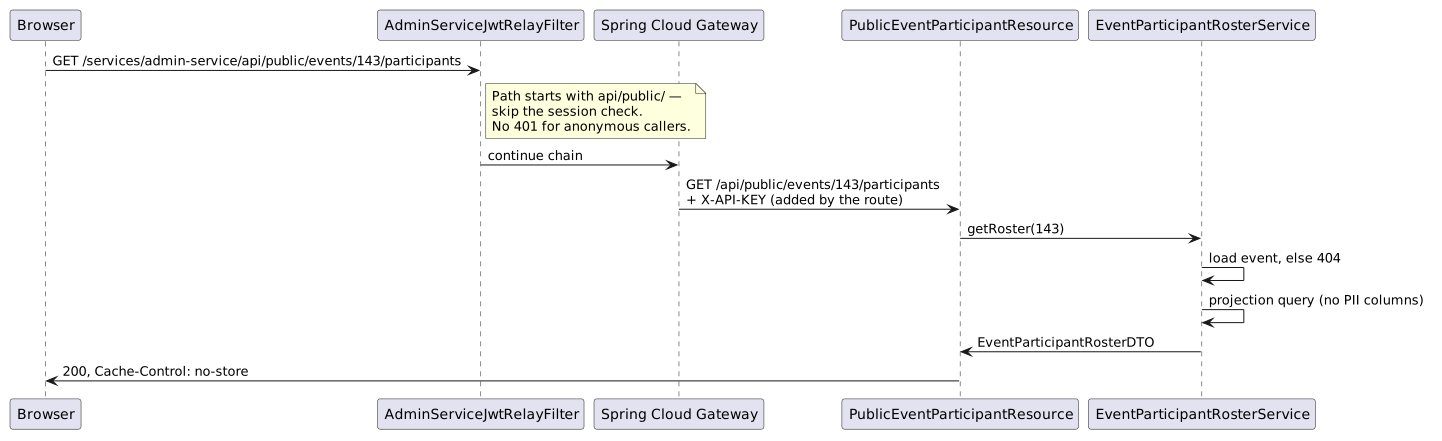
AdminServiceJwtRelayFilter normally fails closed with a 401 on any proxied call that carries no session, so that the frontend can tell an expired session from an anonymous caller. The public prefix is exempted from that check, using the same mechanism already applied to the proxied management/ paths.
The gateway route adds X-API-KEY to every proxied call, including these. That is harmless — the endpoint is permitAll and does not depend on the key. It is worth knowing about, though, because that authority short-circuits the shared security specifications: any future attempt to filter this endpoint’s results through them would silently return everything.
7. Deployment
The screen is served from any tenant host. Adding a host follows the standard tenant provisioning procedure: create the tenant row first, then add the hostname to the ingress, then point DNS at the cluster.
Creating the row before the ingress entry matters — since portal 2.4.1 an unresolved hostname fails loud with a 404 rather than falling back to a default tenant. The roster endpoint itself does not consult the tenant, but the rest of the SPA does, and a host with no tenant row is broken for every other purpose.
Prefer a hostname on a domain we control. A host on a customer-controlled domain cannot solve its ACME HTTP-01 challenge until DNS is delegated, and because all hosts on the ingress share one certificate, a single unreachable host blocks issuance for every other host on it.
Deploy admin-service before the portal, so the portal never calls an endpoint that does not yet exist.
8. Related Documentation
-
Event Registration — the registration flow that produces these participants
-
API Proxy Design — gateway routing and the
/services/**prefix -
Security Architecture — the authenticated paths this screen deliberately bypasses
-
Navigation & Return-State Architecture — why this read-only leaf does not set flow context