Authentication and Identity Selection Requirements
This document defines the authentication and identity selection requirements for event and membership registration. Authentication flows are common across registration types and are referenced from use cases rather than described in detail within each use case.
1. Purpose and Rationale
1.1. Why Authentication Matters
The primary purpose of authentication is to protect personal information of users. Since users revisit the registration portal annually for membership renewal or for multiple events, we store personal data including:
-
Core identity: Names, date of birth, gender
-
Contact details: Email, phone number
-
Related persons: Parents/guardians, emergency contacts
-
Sensitive information: Medical aid details, health conditions
Authentication must be "strong enough" to prevent untrusted parties from accessing this information. However, the goal is not to create friction—users do not necessarily need a full IdP account with MFA. Authentication via OTP (SMS or WhatsApp) is often sufficient for the use case.
1.2. Balancing Security and Conversion
The solution prioritises conversion (completing registration) over strict identity management:
-
The primary goal is to convert a visitor into a registered member or event participant
-
If this requires creating a duplicate person record, that is acceptable
-
Duplicate detection and merge capabilities are built into the solution
-
We actively build merge techniques to deduplicate persons once we detect that two identities or persons are the same
2. Entry Points
2.1. URL Structure
Registration entry points follow a consistent URL pattern:
| Type | URL Pattern | Purpose |
|---|---|---|
Membership |
|
Entry point for membership registration |
Event |
|
Entry point for event registration |
Both entry points share the same authentication implementation but redirect to their respective registration screens after successful authentication.
3. Authentication Methods Overview
The Registration Portal supports three authentication approaches:
| Method | Use Case | User Journey | IdPs per Tenant |
|---|---|---|---|
Hash-Based |
External systems (WordPress, etc.) |
Link from external site with pre-authenticated access |
N/A |
OIDC/SSO |
Organisations with IdP infrastructure |
Redirect to IdP, authenticate, return to registration |
Zero to many |
Guest Mode |
Quick registration, late registration |
Minimal identification, no account required |
N/A |
4. Authentication Flows
4.1. Flow 1: Active Session (Automatic)
Scenario: User already has an active session with a valid JWT.
Behaviour:
-
User accesses registration URL
-
System detects valid JWT in session
-
System redirects immediately to registration screen (HTTP 302)
-
No authentication page is displayed
Outcome: Seamless continuation for authenticated users.
4.2. Flow 2: Hash-Based Authentication
Scenario: URL includes u (userId) and h (userHash) parameters.
User Journey:
-
User receives email or SMS with registration link
-
User clicks link:
/event/15?u=abc123&h=5d41402a… -
Registration portal opens
-
Gateway validates hash and obtains JWT from backend
-
JWT stored in session (user never sees it)
-
User proceeds directly to registration form
If validation fails:
-
User is presented with authentication selection options
-
Hash parameters are cleared from URL
Use Cases:
-
Invitation links sent via email or SMS
-
Renewal reminders with pre-authenticated access
-
Marketing campaign links with tracked users
Token Lifecycle:
-
Hash-based tokens have fixed validity (typically 24 hours)
-
No automatic refresh—expired tokens require new hash from external system
-
Backend returns 401 on token expiry
4.3. Flow 3: OIDC Authentication
Scenario: User selects "Sign in with [IdP]" from authentication options.
User Journey:
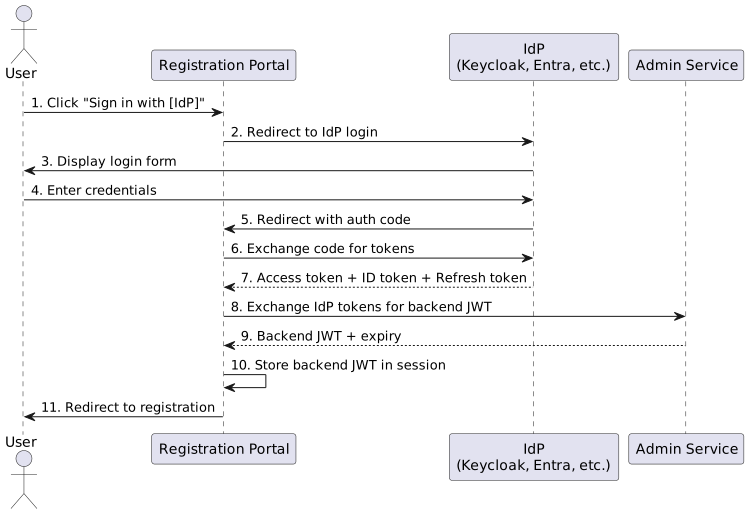
Detailed Steps:
-
User clicks IdP button - "Sign in with Google", "Sign in with Organisation SSO"
-
Redirect to IdP - Standard OIDC authorization code flow
-
User authenticates - Using IdP credentials (may include MFA)
-
IdP redirects back - With authorization code
-
Token exchange - Gateway exchanges code for IdP tokens
-
Backend token exchange - Gateway exchanges IdP tokens for backend JWT
-
Session storage - Backend JWT stored in HTTP session
-
Registration continues - User proceeds with profile loaded
Token Refresh (Automatic):
When the backend JWT expires during an OIDC session:
-
Gateway detects backend JWT expiry before API call
-
Gateway checks if IdP access token is still valid
-
If IdP token expired, gateway uses refresh token to obtain new IdP tokens
-
Gateway exchanges new IdP tokens for fresh backend JWT
-
User continues without interruption
If IdP refresh fails:
-
User is redirected to IdP login page
-
After re-authentication, registration continues from where they left off
4.4. Flow 4: Authentication Selection
Scenario: No hash provided, hash validation failed, or user navigated directly to URL.
Behaviour:
-
User accesses registration URL without valid authentication
-
Authentication selection page is displayed
-
User selects one of the available options:
-
Continue as guest (Flow 4.1: Guest Access)
-
Sign in with identity provider (Flow 4.2: OIDC Identity Providers)
-
Create an account (if supported)
-
4.4.1. Flow 4.1: Guest Access
Label: "Continue as Guest" or "Quick Registration"
Behaviour:
-
User selects guest access option
-
System creates a new
OrgUserwith a generated UUID asuserKey -
System prompts for minimal identifying information:
-
First name
-
Last name
-
Cellphone number
-
-
System performs person matching (see Person Matching in Guest Mode)
-
If match found with high confidence, that person becomes the principal
-
If no match found, system creates a new Person with the provided details
-
User proceeds to registration
Explicit Guest Mode (userKey = "G"):
This flow can be triggered explicitly when userKey is set to "G" for Guest. This supports late registration scenarios where users are queueing at the registration desk.
Guest Mode Restrictions:
In guest mode, even if the principal is identified as an existing person:
-
The system does not display persons previously linked to their profile
-
Users must explicitly add each person they wish to register
-
This ensures explicit consent and prevents accidental registration of others
4.4.2. Flow 4.2: OIDC Identity Providers
Display:
Identity providers configured for the tenant are displayed as authentication buttons:
-
"Sign in with Google"
-
"Sign in with Apple"
-
"Sign in with [Organisation Name]" (e.g., Myriad Events Entra External ID)
The buttons displayed are tenant-specific—each tenant may have zero, one, or many IdPs configured.
Behaviour:
-
User clicks identity provider button
-
System redirects to OIDC provider for authentication (see Flow 3)
-
Upon successful authentication, system loads linked persons associated with profile
-
User proceeds to registration with profile and persons loaded
5. Tenant Configuration
Each tenant configures which authentication options are available:
| Configuration | Description | Example Use Case |
|---|---|---|
Guest Only |
Only guest access available |
Public events with no account requirement |
Guest + Hash |
Guest access and hash-based authentication |
WordPress integration without SSO |
Guest + OIDC |
Guest access and one or more IdPs |
Organisation with SSO but allowing walk-ins |
Hash + OIDC |
External links and SSO, no anonymous |
Renewal-focused with SSO option |
OIDC Only |
Authentication required, no anonymous |
Corporate events requiring identity verification |
Guest + Hash + OIDC |
Full range of options |
Flexible enterprise tenant |
Note: The authentication selection screen dynamically displays only the options configured for the tenant.
6. Person Matching
6.1. Person Matching in Guest Mode
When a user enters guest mode and provides their details (first name, last name, cellphone), the system attempts to identify them:
Matching Priority:
-
Strong match on cellphone number - Phone numbers are relatively unique identifiers
-
Weak match on names - Names are used as supporting evidence but not primary identifiers due to spelling variations
Matching Logic:
-
A match on cellphone number with reasonable name similarity is sufficient for identification
-
The system accounts for common name spelling mistakes
-
A strong overall match selects that person as the principal
-
No match creates a new Person record
6.2. Relaxed Matching for Known Relationships
When adding persons in guest mode, if the principal is identified as an existing person, the system applies relaxed matching rules for adding related persons.
Rationale:
The backend knows which persons are linked to the principal from previous sessions, accounts, or organisations. This prior relationship creates implicit trust that allows for more lenient identification.
7. Identity Management Philosophy
7.1. Avoid Duplication, Accept When Necessary
The system follows this philosophy for identity management:
-
Actively try to match - Always attempt to find existing persons before creating new ones
-
Accept duplication for conversion - If matching fails or is inconclusive, create new records rather than blocking registration
-
Build merge capabilities - Implement detection and merge tools to consolidate duplicates after the fact
-
User experience first - Never let identity management concerns prevent a user from completing registration
7.2. Merge Strategy
Duplicate detection and merging occurs through:
-
Automatic detection: Backend processes identify potential duplicates based on matching rules
-
Manual review: Admin interface allows staff to review and merge detected duplicates
-
Account linking: When a user creates an account with an email matching an existing guest registration, systems prompt for merge
-
Cross-session matching: When hash-based or OIDC authentication identifies a user previously registered as guest
8. Session Management
8.1. JWT Lifecycle
-
JWTs are issued upon successful authentication (hash or OIDC)
-
Guest mode creates a temporary JWT tied to the guest
OrgUser -
JWTs include claims for user identity and organisation context
-
Hash-based authentication overrides any existing JWT
8.2. Token Refresh Behaviour
| Auth Method | On Token Expiry | User Impact |
|---|---|---|
Hash-Based |
Backend returns 401 |
Frontend redirects to home page |
OIDC |
Gateway automatically refreshes via IdP |
Seamless—user continues without interruption |
OIDC (IdP refresh fails) |
Redirect to IdP login |
User re-authenticates, then continues |