Membership Registration
1. Overview
The Membership Registration workflow enables users to apply for membership in an organization. It follows the Phase 2 Registration Design with implementation-specific details for membership scenarios.
Key Features:
-
Multi-person Registration - Register multiple family members in single application
-
Process-Driven Workflow - Sequential question-based forms with back navigation
-
Dynamic Questions - Questions adapt based on membership type and previous answers
-
Payment Integration - External payment gateway integration
-
Resume Capability - Resume incomplete registrations from any step
2. Membership Concepts
2.1. Membership Entities
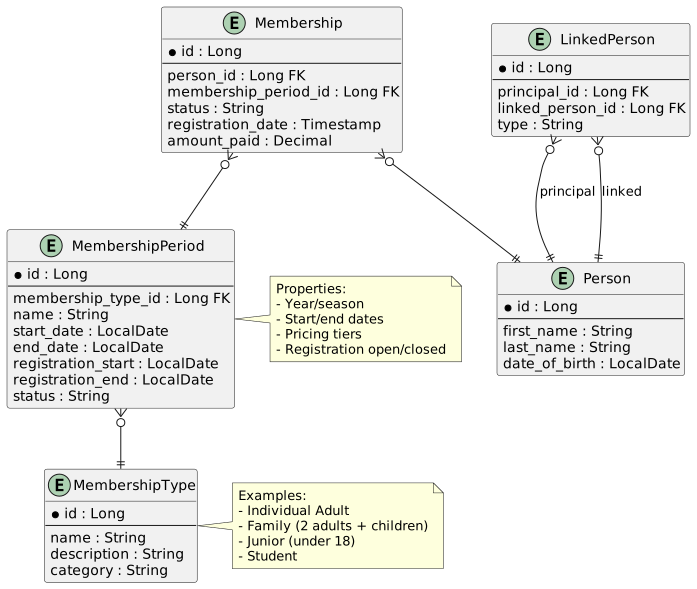
The membership system uses three key entity types:
MembershipType
Defines the category of membership (Individual, Family, Junior, Student, etc.)
MembershipPeriod
Defines an active registration period for a specific membership type:
-
Year or season (e.g., "2024 Season")
-
Start and end dates for registration
-
Pricing information
-
Status (open/closed)
Membership
An individual membership instance:
-
Links a Person to a MembershipPeriod
-
Tracks registration status
-
Stores payment information
-
Records membership details
2.2. Pricing Tiers
Membership pricing varies based on multiple criteria:
| Criteria | Examples |
|---|---|
Number of Persons |
Single person vs. family of 4 |
Age Groups |
Adult (18+), Junior (under 18), Senior (65+) |
Registration Timing |
Early bird, standard, late registration |
Member Type |
New member, renewal, transfer |
Additional Options |
With insurance, with magazine subscription |
Example Pricing Structure:
-
Individual Adult: R500
-
Family (2 adults): R800
-
Family (2 adults + 2 children): R1000
-
Junior (under 18): R300
-
Student (with proof): R350
3. Registration Flow by Step
This section details each step from the Phase 2 Registration Design as it applies to membership registration.
3.1. Step 1: Identity Selection
|
Phase 2 Enhancement: Identity Selection is a new capability being introduced. Current implementation uses hash-based access via URL parameters. |
3.1.1. Current Implementation (Hash-Based Access)
Route Pattern:
/membership/register/:membershipPeriodIdQuery Parameters:
| Parameter | Description | Required | Example |
|---|---|---|---|
|
User key (security context) |
Yes |
|
|
Hash (MD5 of secret + userKey) |
Yes |
|
Example URL:
https://app.example.com/membership/register/42?u=abc123xyz&h=5d41402abc4b2a76b9719d911017c592Security Guard:
Access to membership registration is protected by membershipGuard:
export const membershipGuard: CanActivateFn = (route: ActivatedRouteSnapshot) => {
  const router = inject(Router);
  const membershipPeriodId = route.paramMap.get('membershipPeriodId');
  const pathUserKey = route.paramMap.get('u');
  const queryUserKey = route.queryParamMap.get('u');
  const userKey = pathUserKey || queryUserKey;
  const providedHash = route.queryParamMap.get('h');

  // Both userKey and hash must be present
  if (!userKey || !providedHash) {
    router.navigate(['/membership/register', membershipPeriodId], {
      queryParams: { error: 'Missing security verification parameters' }
    });
    return false;
  }

  // Verify hash
  const expectedHash = Md5.hashStr(SECRET_KEY + userKey);
  if (expectedHash !== providedHash) {
    router.navigate(['/membership/register', membershipPeriodId], {
      queryParams: { error: 'Invalid security verification' }
    });
    return false;
  }

  return true;
};
3.1.2. Phase 2: OIDC Authentication
When OIDC authentication is configured for the tenant, users will be presented with a choice:
-
Authenticate - Sign in via OIDC provider to access existing profile
-
Continue Anonymously - Proceed without authentication
See Identity Selection in the Phase 2 design for details.
3.2. Step 2: Registration Overview
The Registration Overview displays the membership period details and linked persons.
Component: MembershipRegisterComponent
File: src/main/webapp/app/entities/membership/list/membership-register.ts
3.2.1. Loading Membership State
When the component initializes, it loads the membership form state:
private loadMembership(): void {
  this.loading = true;
  this.formService
    .getFormMembership(this.membershipPeriodId, this.userKey)
    .pipe(
      tap(formState => {
        this.formDTO = formState;
        this.linkedPersons = formState.people
          ? Array.from(formState.people)
          : [];
        this.processId = formState.processId;

        // Set selected persons based on API response
        this.selectedPersons = this.linkedPersons
          .filter(person => person.selected);

        if (formState.processState === ProcessInstanceDTO.StatusEnum.Running ||
            formState.processState === ProcessInstanceDTO.StatusEnum.Resume) {
          this.showProcessDialog();
        }
      }),
      takeUntil(this.destroy$),
      finalize(() => (this.loading = false))
    )
    .subscribe();
}
API Endpoint: GET /api/forms/membership/{periodid}?userKey={key}
Response (FormDTO):
{
  "processId": "proc-123",
  "step": 1,
  "processState": "NONE",
  "people": [
    {
      "id": 1,
      "firstName": "John",
      "lastName": "Smith",
      "dateOfBirth": "1985-03-15",
      "status": "Available",
      "canSelect": true,
      "selected": false
    },
    {
      "id": 2,
      "firstName": "Jane",
      "lastName": "Smith",
      "dateOfBirth": "1987-07-20",
      "status": "Available",
      "canSelect": true,
      "selected": false
    },
    {
      "id": 3,
      "firstName": "Billy",
      "lastName": "Smith",
      "dateOfBirth": "2010-11-03",
      "status": "Available",
      "canSelect": true,
      "selected": false
    }
  ]
}
3.2.2. Person Selection Table
@startuml
salt
{
  {T
    | ☐ | Name | Date of Birth | Status | Actions
    + ☐ | John Smith | 1985-03-15 | Available | [Edit] [Remove]
    + ☐ | Jane Smith | 1987-07-20 | Available | [Edit] [Remove]
    + ☑ | Billy Smith | 2010-11-03 | Available | [Edit] [Remove]
  }
  .
  { [+ Add Family Member] | [Clear Selection] | [Continue →] }
}
@enduml
Person Status:
| Status | Meaning | Can Select? |
|---|---|---|
Available |
Can be added to membership |
Yes |
Registered |
Already has active membership |
No |
Pending Payment |
Registration pending payment |
No |
3.2.3. Resume Incomplete Registration
If a process is already running, the user is prompted to resume or start fresh:
showProcessDialog(): void {
  this.sharedDialogService
    .show({
      header: 'Existing Registration',
      message: 'A previous registration attempt has been detected. ' +
               'Would you like to continue with that, or start fresh?',
      buttons: [
        {
          label: 'Start Fresh',
          action: ProcessAction.RESET,
          class: 'p-button-success',
        },
        {
          label: 'Resume',
          action: ProcessAction.RESUME,
          class: 'p-button-primary',
        },
      ],
    })
    .pipe(takeUntil(this.destroy$))
    .subscribe(result => {
      if (result === ProcessAction.RESET || result === ProcessAction.RESUME) {
        this.handleProcessAction(result as ProcessAction);
      }
    });
}
API Endpoints:
-
Reset:
POST /api/forms/processes/{processid}/reset -
Resume:
POST /api/forms/processes/{processid}/resume
3.3. Step 3: Link Person
The Link Person step allows users to add family members to their profile.
See LinkedPerson Management for complete details on the person search, matching, and linking workflow.
Integration with Registration Overview:
toggleSelection(person: FormPersonDTO): void {
  // Only allow selection if canSelect is true
  if (!person.canSelect) {
    return;
  }

  if (this.isSelected(person)) {
    this.selectedPersons = this.selectedPersons.filter(p => p.id !== person.id);
    person.selected = false;
  } else {
    this.selectedPersons.push(person);
    person.selected = true;
  }
}
3.3.1. Submitting Person Selection
register(): void {
  this.loading = true;
  const selectedPersonsDTO = this.linkedPersons
    .filter(person => person.selected)
    .map(person => ({ id: person.id }) as FormPersonDTO);

  this.formService
    .next({
      processId: this.processId,
      step: this.formDTO.step,
      people: selectedPersonsDTO,
    })
    .pipe(
      tap(response => this.handleNextFormResponse(response)),
      takeUntil(this.destroy$),
      finalize(() => {
        this.loading = false;
      })
    )
    .subscribe({
      next: () => {
        this.showQuestionBox = true;
      },
      error: error => {
        this.showQuestionBox = false;
        this.handleError(error);
      }
    });
}
API Endpoint: POST /api/forms/next
Request Body:
{
  "processId": "proc-123",
  "step": 1,
  "people": [
    { "id": 1 },
    { "id": 3 }
  ]
}
3.4. Step 4: Registration Details
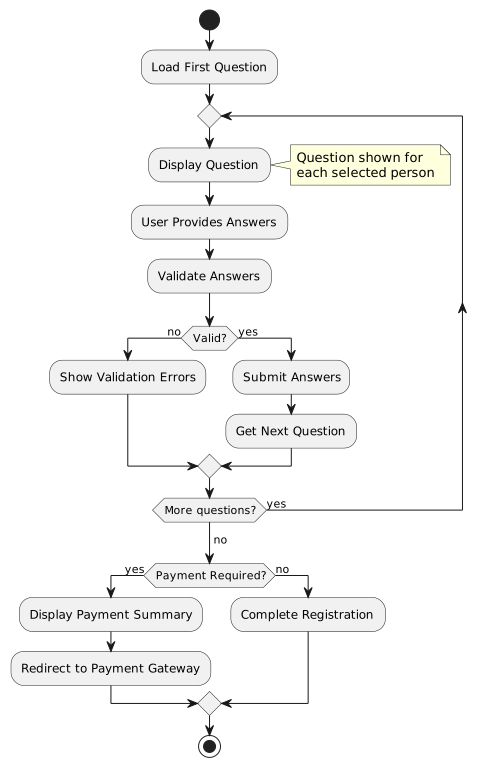
The Registration Details step presents a sequence of questions configured via the ProcessDefinition system.
Component: QuestionDialogComponent
File: src/main/webapp/app/entities/membership/questions/membership-question.ts
3.4.1. Question Types
The system supports multiple question types:
| Type Code | Name | UI Component | Validation |
|---|---|---|---|
|
Text Input |
Input field per person |
Required/Optional text |
|
Number Input |
Number field per person |
Numeric validation |
|
Dropdown |
Select menu per person |
Required selection |
|
Binary Checkbox |
Checkbox per person |
Yes (1) / No (0) |
|
I Accept (Terms) |
Master checkbox |
All must accept (1) |
|
Select One |
Radio buttons |
Exactly one person must be selected |
|
Radio Options |
Radio per person |
Required selection per person |
|
Multi-Select |
Checkbox group per person |
Multiple selections allowed |
3.4.3. Question DTO Structure
{
  "processId": "proc-123",
  "step": 2,
  "processState": "RUNNING",
  "question": "Does anyone have any medical conditions?",
  "questionType": "BCB",
  "required": true,
  "options": null,
  "people": [
    {
      "id": 1,
      "firstName": "John",
      "lastName": "Smith",
      "answer": null,
      "hide": false
    },
    {
      "id": 3,
      "firstName": "Billy",
      "lastName": "Smith",
      "answer": null,
      "hide": false
    }
  ],
  "paymentUrl": null
}
3.4.4. Question UI Examples
Text Input Question
@startuml
salt
{
  What is your emergency contact number?
  .
  John Smith: [ "0821234567" ]
  Billy Smith: [ "0821234567" ]
  .
  { [← Back] | [Clear] | [Next →] }
}
@enduml
Binary Checkbox Question
@startuml
salt
{
  Does anyone have any medical conditions?
  .
  [ ] John Smith
  [X] Billy Smith
  .
  { [← Back] | [Clear] | [Next →] }
}
@enduml
3.4.5. Answer Submission
next() {
  this.loading = true;
  this.selectedPeople = this.people.map(_person => ({
    answer: _person.answer || '0',
    id: _person.id,
  }));

  this.formService
    .next({
      processId: this.questionData.processId,
      step: this.questionData.step,
      people: this.selectedPeople,
    })
    .pipe(finalize(() => (this.loading = false)))
    .subscribe(_response => {
      this.questionData = _response;
      this.people = Array.from(this.questionData?.people || [])
        .map(p => ({
          ...p,
          answer: p.answer || '',
        })) || [];
    });
}
3.4.6. Answer Validation
isValid(): boolean {
  if (!this.questionData.required) {
    return true;
  }

  if (this.questionData.questionType === 'ITC') {
    // For ITC (Terms), all people must have answer '1' (checked)
    return this.people.every(person => person.answer === '1');
  }

  return this.people.every(person => {
    if (person.hide) {
      return true;
    }

    if (this.questionData.questionType === 'BCB') {
      return true; // Binary checkboxes are always valid
    }

    if (this.questionData.questionType === 'ONE') {
      // For required ONE type, at least one person should have answer '1'
      return this.people.some(p => p.answer === '1');
    }

    return person.answer !== null &&
           person.answer !== undefined &&
           person.answer !== '';
  });
}
3.4.7. Membership-Specific Questions
For membership registration, the Registration Details phase may include:
-
Personal Information - Emergency contact, medical conditions
-
Membership Configuration - Family membership selection, primary contact designation
-
Legal Acceptance - Terms, conditions, and indemnity
Family Membership Example:
When registering for a family membership that covers 4 people but 6 are linked:
-
Question asks "Select family members for this membership"
-
User selects which 4 of the 6 people to include
-
Pricing is calculated based on selected family composition
3.5. Step 5: Order Creation
Upon completing Registration Details, the system commits the registration to the admin-service:
-
Membership records created for each person (status: Pending Payment)
-
Order created with line items:
-
Membership fee based on membership type (Individual, Family, Junior, etc.)
-
Additional fees (insurance, administration, etc.)
-
-
Order status set to Unpaid
The order details are then used to either display a reference number for manual payment or create a corresponding WooCommerce order for online payment.
See Order Creation in the Phase 2 design for complete details on the order creation process and payment callbacks.
3.6. Step 6: Payment
3.6.1. Online Payment (WooCommerce)
When all questions are answered, the process completes and displays a payment summary:
@startuml
salt
{
  Registration Complete!
  .
  Summary:
  John Smith (Adult) - R500.00
  Billy Smith (Junior) - R300.00
  .
  Total: R800.00
  .
  { [Pay Now] }
}
@enduml
Payment Redirect:
pay() {
  if (this.questionData.paymentUrl) {
    this.messageService.add({
      severity: 'info',
      summary: 'Payment Portal',
      detail: 'Redirecting to payment portal...',
      sticky: true,
      life: 5000,
    });

    setTimeout(() => {
      if (this.questionData.paymentUrl) {
        window.location.href = this.questionData.paymentUrl;
      }
    }, 5000);
  }
}
Payment URL Format:
https://payment.gateway.com/pay?reference=REF123&amount=800.00&return=https://app.example.com/membership/payment-return3.6.2. Manual Payment
|
Phase 2 Enhancement: Manual payment is a new capability being introduced. See Payment in the Phase 2 design. |
Manual payment will be available for specific tenants/scenarios:
-
System generates reference number with QR code
-
User presents QR code to staff
-
Staff captures payment on registration system
-
Registration completes upon payment confirmation
3.6.3. Payment Return Handling
Return URL: /membership/payment-return
Query Parameters:
-
reference- Payment reference -
status- Payment status (success, failed, cancelled) -
transactionId- Payment transaction ID
Status Updates:
| Status | Description | Next Step |
|---|---|---|
success |
Payment successful |
Activate membership, send confirmation |
failed |
Payment failed |
Show error, allow retry |
cancelled |
User cancelled payment |
Return to registration, allow resume |
3.7. Step 7: Confirmation & Notifications
3.7.1. Immediate Confirmation
Upon successful payment:
-
Membership records created for all selected persons
-
Confirmation displayed with membership numbers
-
Confirmation email sent
Confirmation Display:
Payment Successful!

Membership Numbers:
- John Smith: M2024-1523
- Billy Smith: M2024-1524

A confirmation email has been sent to [email protected]
3.7.2. Scheduled Notifications
|
Phase 2 Enhancement: Scheduled notifications are managed by long-running processes. See Confirmation & Notifications in the Phase 2 design. |
For membership, scheduled notifications include:
-
Welcome message with membership details
-
Membership card/certificate delivery
-
Expiry reminder (typically 1-2 months before expiry)
-
Renewal prompts
4. Process State Management
4.1. Process States
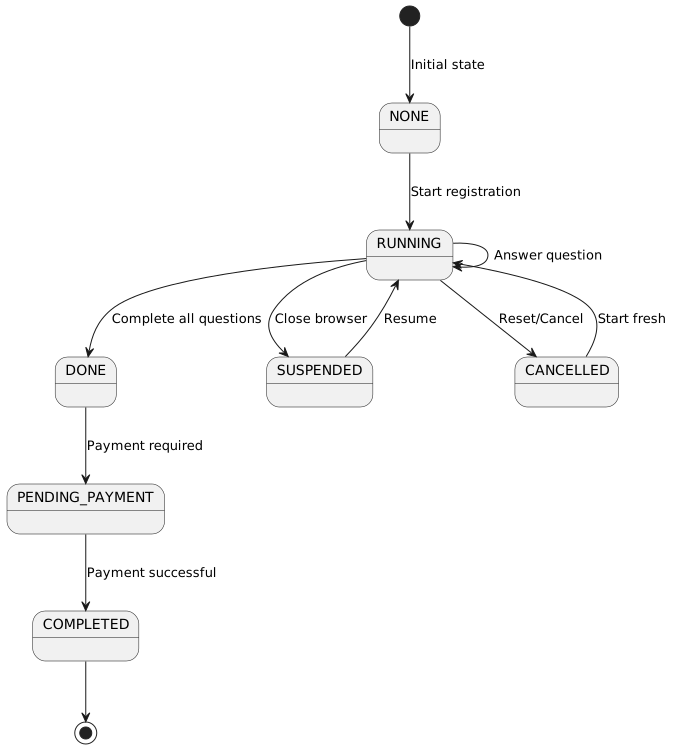
Process State Enum:
export enum ProcessState {
  NONE = 'NONE',
  RUNNING = 'RUNNING',
  SUSPENDED = 'SUSPENDED',
  DONE = 'DONE',
  PENDING_PAYMENT = 'PENDING_PAYMENT',
  COMPLETED = 'COMPLETED',
  CANCELLED = 'CANCELLED',
  RESUME = 'RESUME'
}
4.2. Form Service
The FormService manages process state and progression:
@Injectable({ providedIn: 'root' })
export class FormService {
  private formResourceService = inject(FormResourceService);
  private blobUtils = inject(BlobUtilsService);

  getFormMembership(membershipPeriodId: number, userKey: string): Observable<FormDTO> {
    return this.formResourceService
      .getFormMembership(membershipPeriodId, userKey)
      .pipe(
        mergeMap(response => this.blobUtils.parseBlob<FormDTO>(response)),
        map(formDTO => this.convertToExtendedFormDTO(formDTO))
      );
  }

  reset(processId: string): Observable<FormDTO> {
    return this.formResourceService.reset(processId)
      .pipe(
        mergeMap(response => this.blobUtils.parseBlob<FormDTO>(response)),
        map(formDTO => this.convertToExtendedFormDTO(formDTO))
      );
  }

  resume(processId: string): Observable<FormDTO> {
    return this.formResourceService.resume(processId)
      .pipe(
        mergeMap(response => this.blobUtils.parseBlob<FormDTO>(response)),
        map(formDTO => this.convertToExtendedFormDTO(formDTO))
      );
  }

  next(data: any): Observable<FormDTO> {
    const headers = TimeoutInterceptor.getHeadersWithTimeout(15000);
    const options = {
      httpHeaderAccept: '*/*' as const,
      headers,
    };

    return this.formResourceService.next(data, 'body', false, options)
      .pipe(
        mergeMap(response => this.blobUtils.parseBlob<FormDTO>(response)),
        map(formDTO => this.convertToExtendedFormDTO(formDTO))
      );
  }
}
4.3. API Endpoints
| Method | Endpoint | Purpose | Response |
|---|---|---|---|
GET |
|
Get membership form state |
FormDTO with people and process state |
POST |
|
Submit form step, get next |
FormDTO with next question or completion |
POST |
|
Reset process to start |
FormDTO with initial state |
POST |
|
Resume suspended process |
FormDTO with current step |
5. Error Handling
5.1. Access Denied
ngOnInit(): void {
  const error = this.route.snapshot.queryParamMap.get('error');
  if (error) {
    this.accessDenied = true;
    return;
  }

  if (this.route.snapshot.data['accessDenied']) {
    this.accessDenied = true;
    return;
  }

  this.initializeComponentData();
}
Access Denied Scenarios:
-
Missing user key (
uparameter) -
Missing or invalid hash (
hparameter) -
Expired or invalid membership period
-
User not authorized for organization
6. Integration with Process Entities
The membership registration workflow integrates with the Process entity system:
-
ProcessDefinition - Defines the question workflow template
-
ProcessInstance - Tracks individual registration progress
-
ProcessStep - Each question is a step in the process
-
ProcessStepAnswer - Stores user answers for each step
See Process Flow Integration for complete details on the process engine.
7. Interactive UI Prototypes
Interactive HTML prototypes are available for membership registration screens. See Screen Designs - Interactive UI Prototypes for links to:
-
Registration Overview (Membership) - Person selection with membership details
-
Payment Selection (Membership) - Order summary and payment method choice
-
Manual Payment QR Handoff - Staff capture screen