Security Architecture
1. Overview
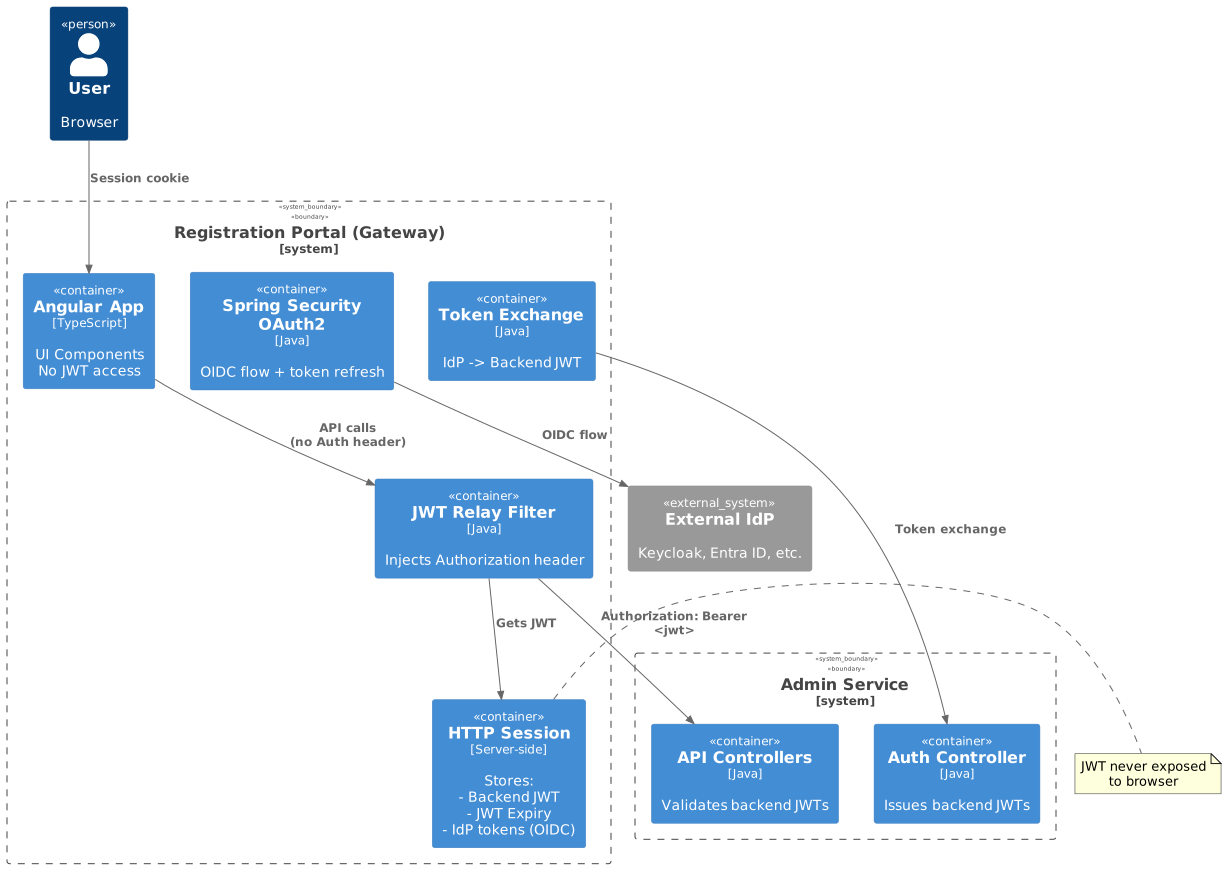
The Registration Portal implements a multi-layered security architecture combining multiple authentication methods, session-based token management, and tenant-scoped data access. A key architectural principle is that JWT tokens are never exposed to the frontend—they are stored server-side in HTTP sessions and relayed to backend services by the gateway.
Security Layers:
-
Authentication - Hash-based JWT or OAuth2/OIDC with backend token exchange
-
Session Management - Server-side JWT storage with automatic refresh
-
Tenant Scoping - Multi-tenant data isolation based on URL subdomain or X-TENANT-ID header
-
Organisation Scoping - Backend-enforced organisation-level data isolation via JWT
-
Person-Level Access - Row-level security for person data
2. Authentication Architecture
The Registration Portal supports two authentication methods depending on the organization’s infrastructure:
| Method | Use Case | Token Refresh |
|---|---|---|
Hash-Based JWT |
External systems (WordPress, etc.) without OAuth2/OIDC capability |
Not supported (24h validity) |
OAuth2/OIDC |
Organizations with external IdP/SSO (Keycloak, Azure AD, Entra External ID, etc.) |
Automatic via IdP refresh tokens |
Both authentication methods result in a backend-issued JWT stored server-side in HTTP sessions. The Angular frontend never sees any JWT tokens.
2.1. Token Architecture Rationale
A critical design decision is that the gateway exchanges IdP tokens for backend-issued JWTs rather than passing IdP tokens directly to the backend. This approach provides several benefits:
| Benefit | Rationale |
|---|---|
Backend Isolation |
The backend only validates its own JWTs, simplifying security implementation |
Multi-Tenant IdP Support |
Different tenants can use different IdPs without backend changes |
Consistent Claims |
Backend JWT always contains standardised claims regardless of IdP |
Token Lifecycle Control |
Backend controls token expiry and claims independently of IdP |
Simplified Backend |
No IdP-specific validation logic required in the backend |
2.2. Hash-Based JWT Authentication
For organizations without OAuth2/OIDC infrastructure (e.g., WordPress sites with custom plugin), the system uses hash-based authentication where the customer website generates a userId and computed hash.
Characteristics:
-
One-time use credentials generated by external system
-
24-hour token validity (configurable)
-
No refresh capability—expired tokens require new hash generation
-
Suitable for invitation links, renewal reminders, marketing campaigns
Flow Summary:
-
Customer website generates userId + userHash
-
User clicks registration link with credentials
-
Angular extracts credentials and calls Gateway
-
Gateway exchanges credentials with Admin Service for JWT
-
JWT stored in HTTP session (never sent to frontend)
-
Subsequent requests use session cookie
2.3. OAuth2/OIDC Authentication
For organizations with external Identity Providers supporting Single Sign-On (SSO):
Characteristics:
-
Standard OIDC authorization code flow with PKCE
-
IdP tokens exchanged for backend JWT after successful authentication
-
Automatic token refresh using IdP refresh tokens
-
Supports multiple IdPs per tenant configuration
Key Design Elements:
-
Token Exchange - Gateway exchanges IdP access_token/id_token for backend JWT
-
Server-Side Storage - Both IdP tokens (managed by Spring Security) and backend JWT stored in session
-
Automatic Refresh - When backend JWT expires, gateway refreshes IdP token and re-exchanges
-
IdP Agnostic Backend - Backend only sees its own JWTs, not IdP tokens
High-Level Flow:
-
User clicks "Login with SSO" → Gateway redirects to external IdP
-
User authenticates with IdP credentials → IdP returns tokens
-
Spring Security stores IdP tokens in session
-
Gateway exchanges IdP tokens with Admin Service for backend JWT
-
Backend JWT stored in HTTP session → User authenticated
-
On expiry, gateway automatically refreshes via IdP
3. User Key Authorization
3.1. User Key Concept
A user key is a secure, unique identifier used for registration workflows without requiring full authentication. It enables:
-
Email/SMS Registration Links - Send secure links to users
-
Temporary Access - Limited access for specific operations
-
Organisation Context - Scoped to specific organisation
-
Person Context - Associated with specific person/family
3.2. User Key URLs
Membership Registration URL:
https://app.example.com/membership/register/42?u=abc123xyz&h=5d41402abc4b2a76b9719d911017c592URL Components:
| Component | Example | Purpose |
|---|---|---|
Domain |
|
Application host |
Path |
|
Registration type and ID |
userKey ( |
|
User identification |
Hash ( |
|
Integrity verification |
4. Tenant and Organisation Context
4.1. Overview
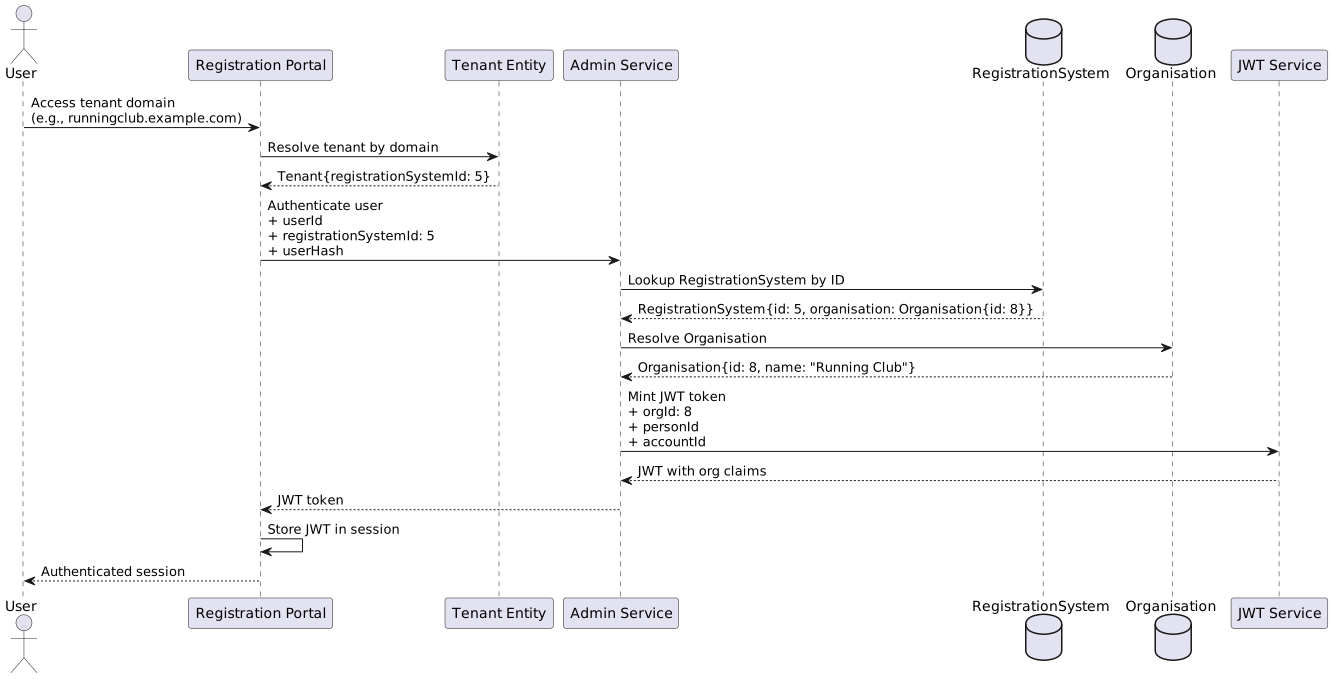
The Registration Portal uses a tenant-based architecture where each tenant is associated with a RegistrationSystem in the Admin Service, which in turn links to an Organisation. This enables proper authentication context while maintaining microservice boundaries.
4.2. Authentication Flow with RegistrationSystem
When a user authenticates within a tenant, the Registration Portal passes the RegistrationSystem ID to the Admin Service to mint a JWT token. The backend uses this ID to identify the Organisation and include the orgId in the JWT.
4.3. Tenant Determination
The Registration Portal determines the tenant using:
-
URL Subdomain (Priority 1) - e.g.,
https://runningclub.example.com/register -
X-TENANT-ID Header (Priority 2) - e.g.,
X-TENANT-ID: runningclub
5. Session Management
5.1. Session-Based Token Storage
The gateway uses HTTP sessions for token storage, providing:
-
Simplified Frontend - Angular never handles JWTs directly
-
Improved Security - Tokens stored server-side, not in browser storage
-
BFF Pattern - Gateway handles all token management
-
Automatic Cookie Handling - Browser sends session cookie automatically
5.2. Token Lifecycle
| Authentication Type | Token Expiry Handling | Refresh Mechanism |
|---|---|---|
Hash-Based |
Backend returns 401 on expiry |
User must obtain new hash from external system |
OIDC |
Gateway detects expiry before request |
Automatic refresh via IdP, then re-exchange for backend JWT |
5.3. ThreadLocal Security Considerations
The Registration Portal uses ThreadLocal storage for tenant context, which requires careful management:
Security Benefits:
-
Thread-safe isolation per request
-
Request-scoped data automatically limited
-
Server-side validation prevents client manipulation
Mitigation:
-
Always clear in finally block
-
Fail fast on missing context
-
Log tenant resolution for audit
7. Authorization
7.1. Role-Based Access Control
| Role | Access Level | Capabilities |
|---|---|---|
|
Standard user |
Register self/family, view own data |
|
Organisation member |
Member benefits, additional features |
|
Organisation admin |
Manage organisation, view reports |
|
System administrator |
Full system access, all organisations |