Architecture
1. Overview
The Registration Portal is built as a JHipster gateway application, providing a single entry point for user interactions while proxying backend operations to the admin-service. This architecture enables authentication, API routing, and a modern Angular frontend.
Application Type: JHipster Gateway with Angular frontend
2. Technology Stack
2.1. Frontend
-
Framework: Angular 17+
-
Build Tools: Node.js 18+, npm 9+, Angular CLI
-
Key Libraries: Angular Router, Reactive Forms, RxJS, Bootstrap 5, NgBootstrap
2.2. Backend (Gateway)
-
Framework: Spring Boot 3.1+
-
Key Components: Spring Cloud Gateway, Spring Security
-
Java Version: Java 17+
3. Architectural Layers
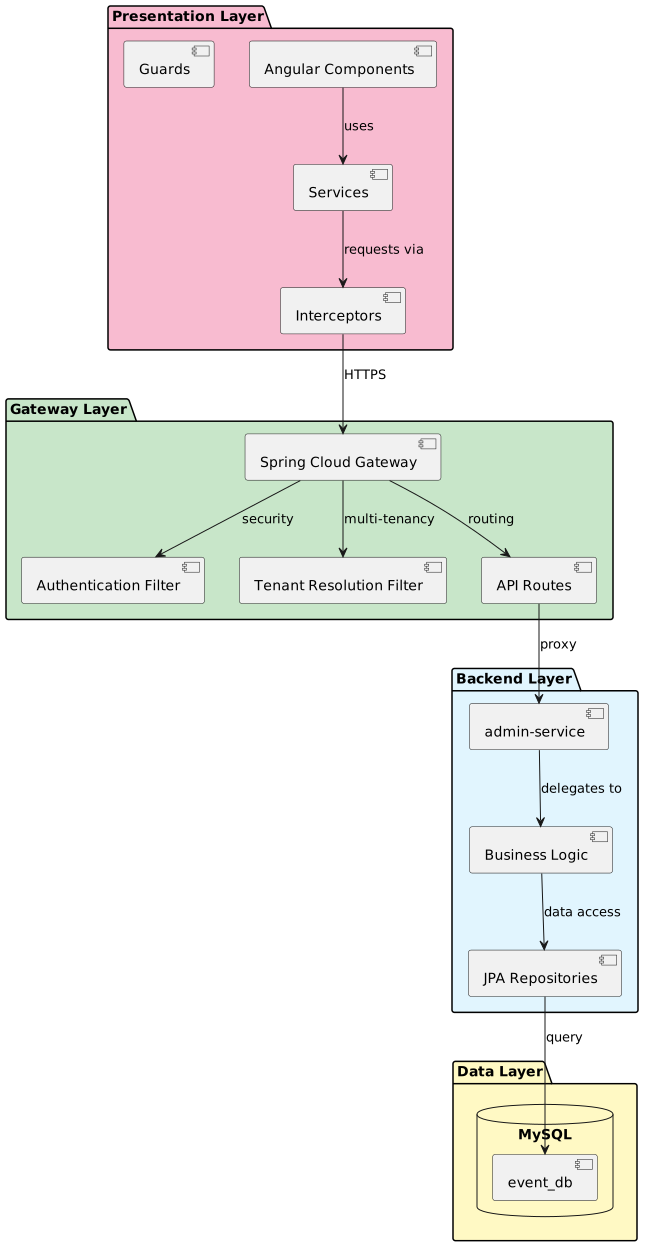
3.1. Presentation Layer
Responsibilities:
-
User interface rendering
-
User interaction handling
-
Client-side validation
-
State management
-
HTTP client operations
4. Multi-Tenant Architecture
The Registration Portal supports multi-tenant operation where a single application instance serves multiple organizations:
-
URL-based Tenant Determination - Subdomain or X-TENANT-ID header
-
Data Isolation - Each organization’s data is completely isolated
-
Shared Infrastructure - Single application deployment serves all organizations
-
Tenant → RegistrationSystem → Organisation - Tenant resolution flows through RegistrationSystem to Organisation
5. Component Structure
5.1. Frontend Structure
src/main/webapp/app/
├── account/                    # User account management
├── admin/                      # Admin features
├── core/                       # Core services
│   ├── interceptor/           # HTTP interceptors
│   └── services/              # Core business services
│       ├── form.service.ts
│       ├── linked-person-state.service.ts
│       └── membership.service.ts
├── entities/                   # Entity management
│   ├── admin-service/         # Proxied entities
│   ├── linked-person/         # LinkedPerson workflows
│   ├── membership/            # Membership workflows
│   └── registration/          # Event registration
├── layouts/                    # Layout components
├── shared/                     # Shared utilities
└── ui/ # UI-specific components6. Development Environment
6.2. Running Locally
Backend (Gateway):
# Start MySQL
docker-compose -f src/main/docker/mysql.yml up -d

# Run gateway
./mvnw spring-boot:run
Frontend (Angular):
npm install
npm start
Access:
-
Application: http://localhost:4200
-
Gateway API: http://localhost:8081
7. Module Contents
-
Security Architecture - Authentication methods (hash-based and OIDC), token exchange architecture, session management, and security layers
-
API Proxy Design - Gateway routing and backend integration
8. Related Documentation
-
Requirements - Functional and non-functional requirements
-
Design - Detailed implementation design